Quick Answer: How Do I Know If My Phone Is Unlocked?
The easiest way to check whether your phone is unlocked is by inserting a SIM card from a different mobile network. If your phone connects successfully and allows you to make calls, send messages, and use mobile data, your device is most likely unlocked.
You can also check your phone’s network status through your device settings, contact your mobile network provider, or use your phone’s IMEI number to confirm whether it is locked to a specific carrier.
Knowing your phone’s unlock status is important before switching networks, travelling internationally, selling your device, or buying a refurbished smartphone. An unlocked phone generally offers greater flexibility and often has a higher resale value. If you’re planning to sell your device, you may also find our guide on How Much Is My Phone Worth? helpful for estimating its current market value.
Introduction
Have you ever inserted a new SIM card into your phone only to see a message saying “SIM Not Supported,” “Network Locked,” or “Invalid SIM”?
If so, you may be wondering: “Is my phone unlocked?”
It’s one of the most common questions smartphone users ask, especially when changing mobile providers, purchasing a second-hand device, or travelling overseas.
Fortunately, checking whether your phone is unlocked is much easier than many people think.
An unlocked smartphone can be used with almost any compatible mobile network, giving you the freedom to choose better tariffs, cheaper SIM-only deals, and local SIM cards when travelling abroad. In contrast, a locked phone only works with the network it was originally supplied by until it has been officially unlocked.
Many people mistakenly believe that SIM-free and unlocked mean different things. In reality, most SIM-free phones are already unlocked, although it’s still worth checking before buying or selling a device. If you’d like to understand the difference in more detail, our guide on What Is a SIM Free Phone? explains everything you need to know.
Whether you own an iPhone, Samsung Galaxy, Google Pixel, Motorola, OnePlus, Xiaomi, Oppo, or another Android device, this guide will explain:
- What an unlocked phone actually means
- The difference between locked and unlocked phones
- How to check if your phone is unlocked
- How to unlock a network-locked phone
- Why unlocked phones are worth more
- What to check before buying a used or refurbished smartphone
By the end of this guide, you’ll know exactly how to determine your phone’s network status and avoid common buying or selling mistakes.
Why Does It Matter If Your Phone Is Unlocked?
Many people don’t think about their phone’s network status until they want to change providers or upgrade their device. However, whether your phone is unlocked can affect much more than simply which SIM card you use.
Knowing your phone’s unlock status can help you:
- Switch to cheaper mobile plans.
- Use any compatible UK network.
- Avoid unnecessary roaming charges while travelling.
- Increase your phone’s resale value.
- Make selling your phone easier.
- Buy refurbished devices with greater confidence.
- Avoid compatibility problems when purchasing second-hand phones.
For example, if you’re planning to purchase a refurbished smartphone, checking whether it’s unlocked should be one of the first things you do. It’s just as important as confirming the battery health, cosmetic condition, and repair history.
Similarly, before purchasing a used handset, it’s worth checking whether the phone has been reported as lost or stolen. Our guide on How to Check if a Phone Is Blacklisted Before Buying explains exactly how to do this.
What Does an Unlocked Phone Mean?
An unlocked phone is a smartphone that isn’t restricted to a single mobile network. This means you can insert almost any compatible SIM card, and the phone will connect without requiring permission from the original carrier.
For example, if your phone is unlocked, you can switch between networks such as EE, O2, Vodafone, Three, Tesco Mobile, or other UK providers simply by changing your SIM card.
You aren’t tied to long-term contracts or a single provider. Unlocked phones are particularly useful if you:
- Regularly switch mobile providers.
- Travel abroad frequently.
- Prefer SIM-only contracts.
- Buy refurbished phones.
- Sell smartphones privately.
Because unlocked phones appeal to more buyers, they usually retain their value better than network-locked devices.
Pro Tip: If you’re buying a second-hand phone, always check both the unlock status and IMEI before making payment.
What Is a Locked Phone?
A locked phone works differently. When a smartphone is locked, it’s programmed to accept SIM cards from only one mobile network.
For example, if your phone was supplied by a particular carrier under a contract, inserting another provider’s SIM card may display messages such as:
- SIM Not Supported
- Invalid SIM
- Network Locked
- SIM Network Unlock PIN Required
This doesn’t necessarily mean there’s anything wrong with your phone. It simply means the device has been restricted to a particular network.
Some carriers automatically unlock phones once the contract ends, while others require customers to request an unlock.
Locked vs Unlocked Phones
Understanding the difference makes it much easier to know which type of phone best suits your needs.
| Locked Phone | Unlocked Phone |
|---|---|
| Works only on one network | Works on most compatible networks |
| Limited flexibility | Complete freedom to switch providers |
| Lower resale value | Higher resale value |
| May require an unlock request | Ready to use immediately |
| Less attractive to buyers | Popular in the refurbished market |
For most users, an unlocked phone is the better long-term investment because it provides greater flexibility and stronger resale potential.
Are SIM-Free Phones Always Unlocked?
This is one of the biggest misconceptions among smartphone buyers. In most cases, yes.
A SIM-free phone is usually sold without being tied to any mobile network, meaning it is already unlocked and ready to use with any compatible SIM card.
However, there are exceptions. Some older devices may have been relocked by previous owners, imported from another region, or supplied under special business contracts.
Because of this, it’s always worth confirming the unlock status before buying any second-hand or refurbished phone. If you’re considering buying refurbished technology, you’ll also find these buying guides useful:
- What Does Refurbished Mean?
- Refurbished vs Second-Hand Phones: What’s the Difference?
- Are Refurbished Phones Good?
- Complete Guide to Choosing the Best Refurbished iPhone
These guides explain what to expect when buying professionally refurbished smartphones and how to avoid common buying mistakes.
Why Are Unlocked Phones Worth More?
One of the biggest advantages of an unlocked phone is its resale value. Because buyers can use an unlocked device on almost any compatible network, demand is generally much higher.
Professional refurbishment companies also prefer unlocked phones because they can be sold to a much wider customer base. As a result, unlocked devices often receive:
- Better trade-in offers
- Higher private sale prices
- Faster sales
- Greater buyer interest
If you’re planning to upgrade your smartphone soon, checking whether your phone is unlocked could increase the amount you receive when selling it.
Combined with good battery health, excellent cosmetic condition, and professional maintenance, an unlocked device can significantly improve your phone’s overall market value.
Pro Tip: If you’re buying a second-hand phone, always check both the unlock status and IMEI before making payment.
How to Check if Your Phone Is Unlocked
Now that you understand what an unlocked phone is and why it matters, it’s time to find out whether your own device is unlocked. Fortunately, there isn’t just one method. Depending on your phone and what information you have available, there are several reliable ways to check.
Some methods take less than a minute, while others require contacting your mobile network provider. For the most accurate results, it’s worth using more than one method if you’re unsure.
Let’s look at each option.
Method 1: Insert a SIM Card from Another Network (Best Method)
The simplest and most reliable way to check whether your phone is unlocked is to try another SIM card.
This method works on almost every smartphone, including iPhones, Samsung Galaxy devices, Google Pixel phones, Motorola, Xiaomi, OnePlus, Oppo, Huawei, and most Android phones.
How to Test Your Phone
- Turn off your phone.
- Remove your current SIM card.
- Insert a SIM card from a different UK network.
- Turn the phone back on.
- Wait for the network to connect.
If Your Phone Is Unlocked
If your phone:
- Detects the new network
- Shows signal bars
- Lets you make calls
- Sends text messages
- Connects to mobile data
then your phone is almost certainly unlocked.
If Your Phone Is Locked
Instead, you may see messages like:
- SIM Not Supported
- SIM Network Unlock PIN
- Invalid SIM
- Network Locked
- SIM Not Valid
These messages usually indicate that the phone is locked to another carrier. This method is widely regarded as the quickest and most reliable way to confirm a phone’s unlock status.
Method 2: Check if Your iPhone Is Unlocked
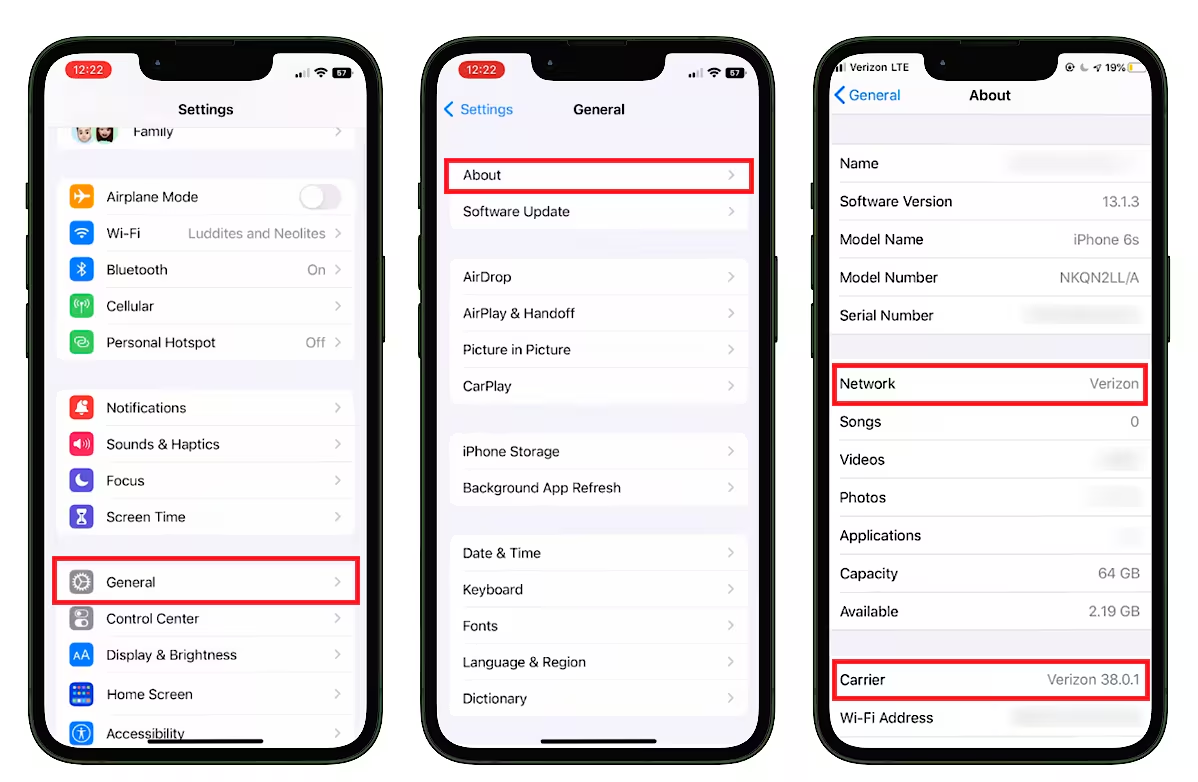
Apple makes checking network lock status much easier than many Android manufacturers. If you’re using iOS 14 or later, you can usually see your carrier lock status directly within your settings.
Steps
Open:
Settings → General → About
Scroll down until you find:
Carrier Lock
If it says:
No SIM Restrictions
your iPhone is unlocked.
If it displays a specific carrier name or another restriction, your iPhone may still be locked.
Depending on your iOS version, the wording may vary slightly, but “No SIM Restrictions” is the clearest indication that your iPhone can be used with different mobile networks.
1. Older iPhones
Some older iPhones don’t display the Carrier Lock section. In this case, the easiest option is to:
- Test another SIM card
- Contact your original network
- Check using your IMEI number
2. Buying a Refurbished iPhone?
When purchasing a refurbished iPhone, it’s good practice to check more than just the unlock status. You should also confirm:
- Battery Health
- Cosmetic Condition
- Repair History
- Device Age
- Blacklist Status
These checks help ensure you’re buying a reliable device that offers excellent long-term value.
Method 3: Check if Your Samsung Phone Is Unlocked
Samsung doesn’t include a dedicated “Unlocked” section like Apple. Instead, Samsung users normally verify the status using a different SIM card or by checking network information.
Warning: Avoid unofficial unlocking services that promise instant unlocks, as they may void warranties or permanently damage your device.
Option 1 – Different SIM Card
Insert another provider’s SIM.
If the phone connects successfully, it’s unlocked.
Option 2 – Network Settings
On many Galaxy phones, open:
Settings → Connections → Mobile Networks
Although these settings don’t always confirm whether a device is unlocked, they can sometimes indicate whether your phone accepts different networks.
Option 3 – Contact Samsung or Your Network
If you’re still unsure, your network provider can confirm whether the device remains locked.
Method 4: Check Any Android Phone
Android phones vary between manufacturers, but the overall process is similar. Whether you own a:
- Google Pixel
- Motorola
- OnePlus
- Xiaomi
- Oppo
- Honor
- Nokia
- Sony Xperia
the easiest approach remains testing another SIM card. Some manufacturers also display carrier information within:
Settings → About Phone
or
Settings → SIM & Mobile Network
However, these menus differ depending on the Android version. If you can’t find any network information, don’t worry. Testing another SIM remains the most dependable option.
Method 5: Check Using Your IMEI Number
Every mobile phone has a unique IMEI (International Mobile Equipment Identity) number. Your network provider can use this number to check whether your phone is:
- Locked
- Unlocked
- Blacklisted
- Still under contract
How to Find Your IMEI
Dial:
*#06#
Your IMEI will immediately appear on the screen. You can also find it in:
Settings → About Phone
or
printed on the original retail box. Before purchasing any second-hand phone, checking the IMEI is strongly recommended. It helps verify both the network status and whether the device has been reported lost or stolen.
Method 6: Contact Your Mobile Network
If you’re unable to determine your phone’s status yourself, your mobile provider can usually confirm it. They’ll normally ask for:
- Your phone number
- IMEI number
- Account details
- Proof of ownership
Most UK providers can tell you:
- Whether your phone is locked
- Whether it’s eligible for unlocking
- Whether any contract restrictions remain
This is often the most accurate method for phones purchased directly from a network.
Common Messages That Mean Your Phone Is Locked
Many users panic when they see unfamiliar messages after changing SIM cards. Fortunately, these messages usually indicate only one thing – your phone is restricted to another network.
Common examples include:
- SIM Not Supported
- Invalid SIM
- SIM Network Unlock PIN
- Network Locked
- Enter Unlock Code
- Unsupported SIM
- SIM Card Registration Failed
Seeing one of these messages doesn’t necessarily mean your phone is faulty. It usually means the phone needs to be officially unlocked before it can accept another provider’s SIM card.
Can a Phone Become Locked Again?
Generally, no. Once a phone has been officially unlocked by its original carrier, it normally remains unlocked permanently. However, there are a few exceptions.
For example:
- Incorrect software modifications
- Unofficial unlocking methods
- Replacement motherboards
- Certain imported devices
These situations are relatively uncommon. If you purchase from a trusted refurbishment specialist, the unlock status should already be verified before the device is sold.
Why Unlocked Phones Are Better for Travelling
Unlocked phones are especially useful if you travel internationally. Instead of paying expensive roaming charges, you can simply purchase a local SIM card when you arrive in another country.
Benefits include:
- Lower call costs
- Cheaper mobile data
- Local phone numbers
- Better network coverage
- No expensive international roaming fees
This flexibility is one of the reasons unlocked phones remain highly desirable in both the new and refurbished smartphone markets.
Pro Tip: If you’re buying a second-hand phone, always check both the unlock status and IMEI before making payment.
How to Unlock a Locked Phone?
If you’ve discovered that your phone is locked to a particular network, don’t worry. In most cases, it can be unlocked legally and permanently.
Years ago, many UK mobile providers locked phones to their own network. Today, this is far less common, especially for newer smartphones. However, older devices or phones purchased through certain contracts may still be network locked.
The unlocking process depends on your mobile provider, your contract status, and whether the phone has been fully paid off.
Can You Unlock a Phone for Free?
In many cases, yes.
Most UK mobile networks will unlock your phone free of charge if it meets their eligibility requirements. Typically, you may need to:
- Finish your contract
- Pay off any remaining device balance
- Verify your account ownership
- Provide your phone’s IMEI number
Some providers unlock eligible devices automatically, while others require you to submit a request. If your phone isn’t eligible yet, your provider will usually explain what requirements still need to be met.
How Long Does Phone Unlocking Take?
The waiting time varies depending on the mobile network. Some providers can unlock a phone within a few hours, while others may take several working days.
Generally, you can expect:
- Immediate unlocking for some newer devices
- 1–3 working days for many UK networks
- Up to 10 working days in more complex cases
Once the unlock has been completed, you’ll usually receive confirmation by email or text message.
Does Unlocking Affect Your Warranty?
This is another question many people ask. If your phone is officially unlocked by your mobile network, your manufacturer’s warranty is generally not affected. Official carrier unlocking is recognised by Apple, Samsung, Google, and other manufacturers.
However, using unofficial software or unauthorised third-party unlocking services could create problems and may affect warranty coverage. For this reason, it’s always recommended to request unlocking directly from your mobile network whenever possible.
Will Unlocking Delete My Data?
No. Official network unlocking does not erase your:
- Photos
- Contacts
- Messages
- Apps
- Videos
- Documents
Your personal data remains on the device. Even so, it’s always sensible to create a backup before making any changes to your phone.
If you’re using an iPhone, our guide on How to Backup iPhone on the Phone guide explains how to back up your data before making changes or upgrading to another device. If you’re replacing your handset altogether, you may also find How to Transfer Data to a New iPhone guide useful.
Can I Unlock a Phone That Still Has a Contract?
Sometimes. Whether you can unlock your phone depends on your mobile provider’s policy. Some providers allow unlocking before the contract ends, while others require the device to be fully paid off first.
If outstanding finance remains on the handset, your provider may ask you to settle the balance before processing the unlock request. The best approach is to contact your network directly for confirmation.
Buying a Used Phone? Check the Unlock Status First
If you’re buying a second-hand smartphone, never assume it’s unlocked. Many buyers only discover a network restriction after inserting their own SIM card.
Before purchasing, always check:
- Whether the phone is unlocked
- The IMEI status
- Battery health
- Cosmetic condition
- Repair history
- Whether the device has been blacklisted
A few minutes of checking can help you avoid expensive problems later.
Why Buy an Unlocked Refurbished Phone?
Professionally refurbished unlocked phones offer one of the best combinations of value, flexibility, and reliability. Unlike many privately sold devices, professionally refurbished phones are carefully tested, securely data-wiped, inspected, and prepared for resale.
An unlocked refurbished phone lets you:
- Choose any compatible UK network
- Switch providers whenever you like
- Avoid expensive contract restrictions
- Save money compared with buying new
- Enjoy premium performance at a lower price
Whether you’re looking for an Apple or Samsung device, buying refurbished can be a smart financial decision.
Explore iExpert Market’s range of Refurbished iPhones and Refurbished Samsung Phones, where every eligible device is professionally tested, quality checked, and backed by a 12-month warranty.
FAQs About How to Know If Your Phone Is Unlocked
1. How do I know if my phone is unlocked?
The easiest method is to insert a SIM card from another mobile network. If your phone connects successfully and allows calls and mobile data, it is most likely unlocked.
2. Can I check if my iPhone is unlocked without another SIM?
Yes. On most recent iPhones, go to:
Settings → General → About → Carrier Lock
If it displays No SIM Restrictions, your iPhone is unlocked.
3. Are all SIM-free phones unlocked?
Most SIM-free phones are unlocked, although it’s always worth checking before buying a used or refurbished device.
4. Can a locked phone be unlocked?
Yes. In most cases, your mobile provider can unlock your phone once it meets their eligibility requirements.
5. Is unlocking a phone legal in the UK?
Yes. Requesting an official network unlock through your provider is completely legal.
6. Will unlocking improve my phone’s resale value?
Generally, yes. Unlocked phones appeal to more buyers and often achieve higher resale prices. If you’re planning to sell your handset, read How Much Is My Phone Worth? guide to understand which factors influence its value.
7. Does unlocking remove my apps or photos?
No. Official unlocking does not erase your personal data.
8. Can I use an unlocked phone abroad?
Yes. One of the biggest advantages of an unlocked phone is the ability to use local SIM cards while travelling internationally.
9. What’s the difference between an unlocked phone and a SIM-free phone?
A SIM-free phone is usually sold without a contract, while an unlocked phone refers to a device that can be used with different compatible mobile networks. In most cases, SIM-free phones are already unlocked.
10. Should I buy an unlocked refurbished phone?
Absolutely. Professionally refurbished unlocked phones offer excellent value, flexibility, and reliability while costing significantly less than buying brand new.
Conclusion
Knowing whether your phone is unlocked is essential before changing networks, travelling abroad, selling your device, or buying a replacement. Fortunately, checking your phone’s unlock status is straightforward. Whether you use a different SIM card, check your device settings, verify the IMEI number, or contact your mobile provider, you’ll quickly find out if your handset is ready to work with other compatible networks.
Unlocked phones provide greater freedom, stronger resale value, and a better overall ownership experience. They allow you to switch providers whenever you choose, take advantage of competitive SIM-only deals, and use local SIM cards when travelling overseas.
If you’re planning to upgrade, choosing a professionally refurbished unlocked device is an excellent way to save money without compromising on quality. At iExpert Market, you’ll find a wide range of Refurbished iPhones and Refurbished Samsung, all professionally tested, securely data-wiped, quality checked, and backed by a 12-month warranty.
Whether you’re purchasing your first refurbished phone or replacing your current handset, checking that it’s unlocked is one of the smartest decisions you can make before completing your purchase.
Why Choose iExpert Market for Your Next Smartphone?
Whether you’re upgrading your current handset or buying your first refurbished device, choosing a trusted retailer is just as important as selecting the right phone.
At iExpert Market, we specialise in professionally refurbished smartphones, tablets, laptops, and other premium tech that offer exceptional value without compromising on quality.
Every eligible device is:
- Professionally tested by experienced technicians
- Securely data-wiped before resale
- Fully functional and quality checked
- Available in a range of cosmetic grades
- Backed by a 12-month warranty
- Covered by fast UK delivery and dedicated customer support
Whether you’re looking for a Refurbished iPhone, Samsung Galaxy, refurbished iPad, or MacBook, you can shop with confidence knowing every device has undergone rigorous inspection before reaching our customers.
Back to posts