Quick Answer:What Does It Mean When a Phone Is Blacklisted?
A blacklisted phone is a device that has been reported as lost, stolen, involved in fraud, or blocked due to an unpaid contract. Before buying any used or refurbished phone, always check its IMEI number using a trusted IMEI checker. This confirms whether the device is blacklisted, network blocked, or has outstanding finance. Buying from a reputable retailer like iExpert Market also reduces the risk, as professionally refurbished phones are fully tested, IMEI checked, and sold with a warranty.
Introduction
Buying a used or refurbished smartphone is one of the smartest ways to save money, but it also comes with risks if you don’t know what to check first. One of the biggest mistakes buyers make is purchasing a phone that has been blacklisted, only to discover later that it cannot connect to UK mobile networks. This can leave you with an expensive device that is difficult – or even impossible – to use for calls, texts, or mobile data.
The good news is that checking whether a phone is blacklisted is quick, free in many cases, and only requires the phone’s IMEI number. Taking a few minutes to verify this information can help you avoid scams, stolen devices, and unexpected financial losses.
In this complete UK buying guide, you’ll learn what a blacklisted phone is, why phones become blacklisted, how to check an IMEI before buying, warning signs to look for, and why purchasing a professionally refurbished device from a trusted retailer like iExpert Market is often the safest choice. If you’re also considering a refurbished device, be sure to read our Refurbished vs Second-Hand Phones: What’s the Difference? for a detailed comparison.
What Does It Mean When a Phone Is Blacklisted?
A blacklisted phone is a mobile device that has been added to a shared database used by UK mobile networks because it has been reported as:
- Lost
- Stolen
- Fraudulently obtained
- Subject to unpaid finance or contract issues (in some cases)
When a phone is blacklisted, its International Mobile Equipment Identity (IMEI) number is blocked. Since every mobile phone has a unique IMEI, networks can prevent that specific device from connecting to their services.
Unlike a software issue, a blacklist is linked to the phone itself rather than the SIM card. Even if you insert a different SIM or perform a factory reset, the blacklist remains attached to the device.
For this reason, checking the IMEI before purchasing any second-hand phone is one of the most important steps you can take.
Why Do Phones Get Blacklisted?
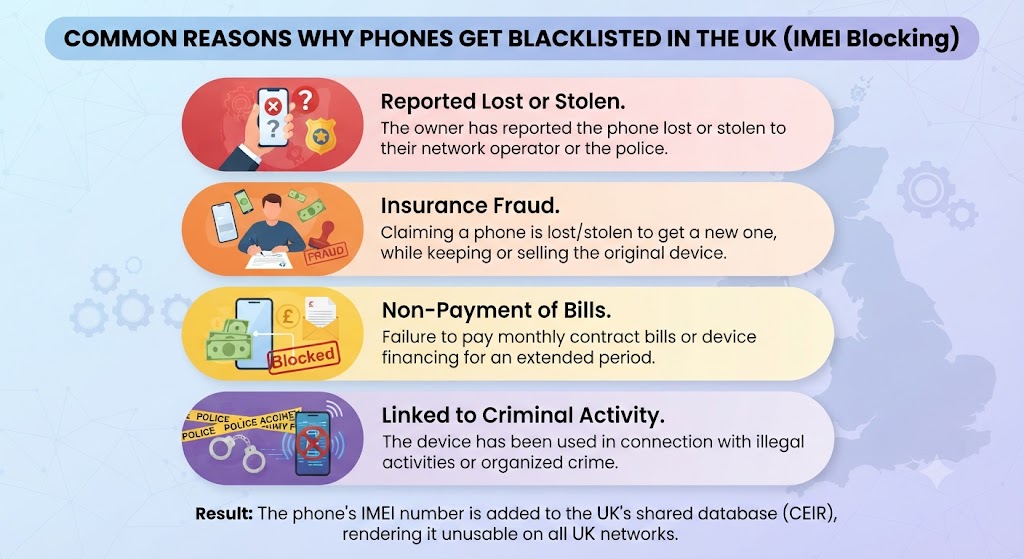
Understanding why a phone becomes blacklisted can help you avoid purchasing one unknowingly.
1. The phone was reported as stolen
This is the most common reason. When the owner reports the theft to their mobile network, the IMEI is added to the blacklist to prevent criminals from using or selling the device.
2. The phone was reported as lost
Many people report lost phones to their carrier to stop anyone else from using them. If the phone is later recovered, the owner must request that the blacklist be removed.
3. Outstanding finance or unpaid contracts
Some phones purchased on finance may eventually become blocked if contractual obligations aren’t met. This depends on the carrier and the circumstances.
4. Insurance fraud
If someone claims on their phone insurance and reports the device as lost or stolen while keeping or selling it, the insurer may request that the IMEI be blacklisted.
5. Fraudulent activity
Phones linked to fraudulent purchases or account abuse may also be blocked by network providers.
Understanding these situations highlights why buying from unknown sellers carries more risk than purchasing from a trusted refurbished retailer.
Can You Use a Blacklisted Phone?
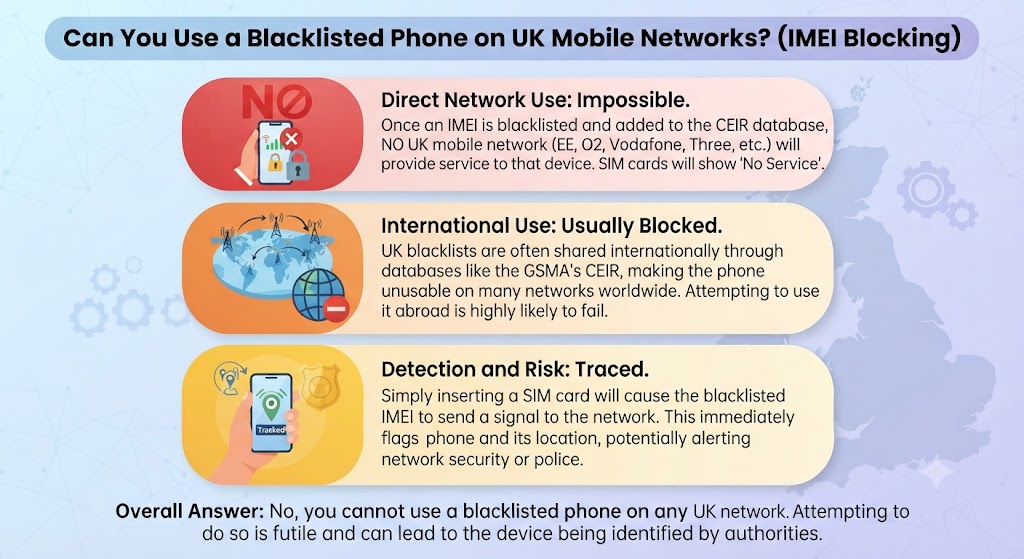
Whether you can use a blacklisted phone depends on why it was blacklisted and where you intend to use it. In most cases, a blacklisted phone cannot connect to UK mobile networks, meaning you won’t be able to make calls, send text messages, or use mobile data with a SIM card.
However, some functions may still work, including:
- Connecting to Wi-Fi
- Using apps that don’t require a mobile network
- Taking photos and videos
- Playing games
- Streaming content over Wi-Fi
While this may sound useful, buying a blacklisted phone is rarely worth the risk. It can be difficult to resell, may have little trade-in value, and could even be confiscated if it’s identified as stolen property. For most buyers, choosing a professionally refurbished phone is a much safer investment.
If you’re unsure whether buying refurbished is the right option, our “Are Refurbished Phones Good?” guide explains the benefits and what to expect from a professionally restored device.
Signs a Phone May Be Blacklisted
Although the only reliable way to confirm a blacklist is by checking the IMEI number, there are several warning signs that should make you cautious before buying.
1. The Price Seems Too Good to Be True
A flagship smartphone being sold hundreds of pounds below its typical market value should immediately raise concerns.
Scammers often advertise expensive iPhones and Samsung Galaxy devices at unusually low prices to encourage quick purchases before buyers ask questions. Always compare prices with trusted retailers before committing to a purchase.
2. The Seller Refuses to Share the IMEI Number
A genuine seller should have no issue providing the phone’s IMEI before the sale.
If someone refuses, makes excuses, or insists you’ll receive the IMEI only after payment, it’s usually a major red flag. A reputable refurbished retailer will already have completed IMEI checks before listing the device.
3. No Proof of Purchase
Ask whether the seller has:
- Original purchase receipt
- Order confirmation
- Warranty documentation
- Original box (if available)
While not every second-hand phone includes these items, having them increases confidence that the phone has a legitimate history.
4. The Phone Is Locked to an Unknown Account
If an iPhone still has Activation Lock enabled or an Android phone remains linked to the previous owner’s Google account, you should avoid buying it until the account has been removed.
Activation locks are different from blacklists, but both can prevent you from using the device properly.
5. The Seller Wants Cash Only
Be cautious if someone insists on:
- Cash payments only
- No receipts
- Meeting in unusual locations
- Immediate payment without inspection
Using secure payment methods provides better protection if something goes wrong.
6. The Seller Avoids Your Questions
If the seller becomes defensive when you ask about:
- IMEI number
- Network status
- Ownership
- Finance history
it’s usually best to walk away and look elsewhere.
How to Find a Phone’s IMEI Number?
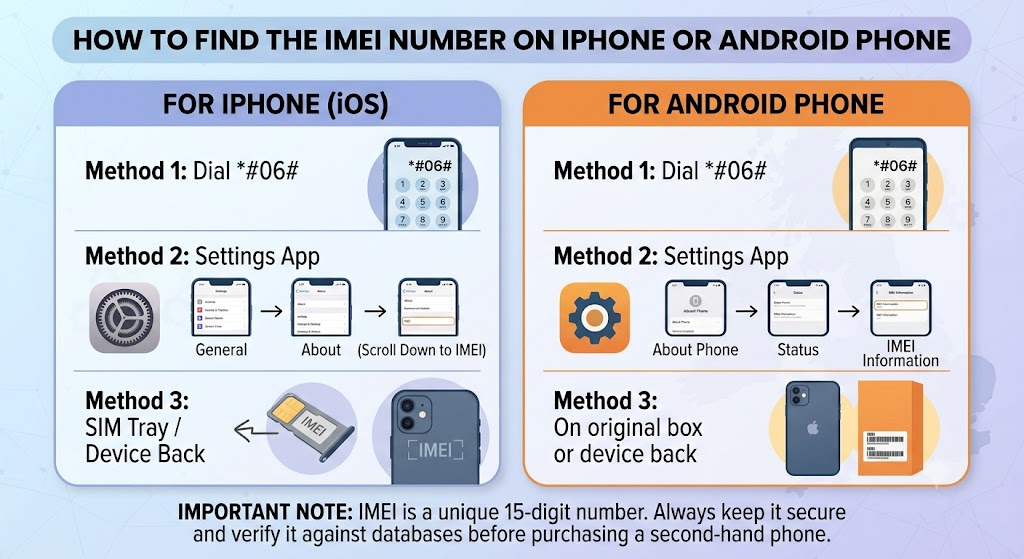
Before checking whether a phone is blacklisted, you’ll first need its IMEI (International Mobile Equipment Identity) number.
An IMEI is a unique 15-digit identification number assigned to every mobile phone. Mobile networks use this number to identify devices and determine whether they have been blacklisted.
Here are the easiest ways to find it.
1. Dial *#06#
The quickest method is to open the phone app and dial:
*#06#
The IMEI number will instantly appear on the screen.
This works on most:
- iPhones
- Samsung phones
- Google Pixel devices
- Other Android smartphones
2. Check the Settings Menu
On iPhone
Go to:
Settings → General → About
Scroll down until you see the IMEI number.
On Samsung & Android
Open:
Settings → About Phone → IMEI Information
The IMEI will be displayed there.
3. Look on the SIM Tray
Many modern smartphones have the IMEI printed directly on the SIM tray.
This is particularly common on recent:
- iPhones
- Samsung Galaxy phones
- Google Pixel devices
4. Check the Original Box
If the seller still has the retail packaging, you’ll usually find the IMEI printed on the barcode label. Make sure this number matches the one shown in the phone’s settings.
If they don’t match, avoid the purchase.
How to Check if a Phone Is Blacklisted (Step-by-Step)
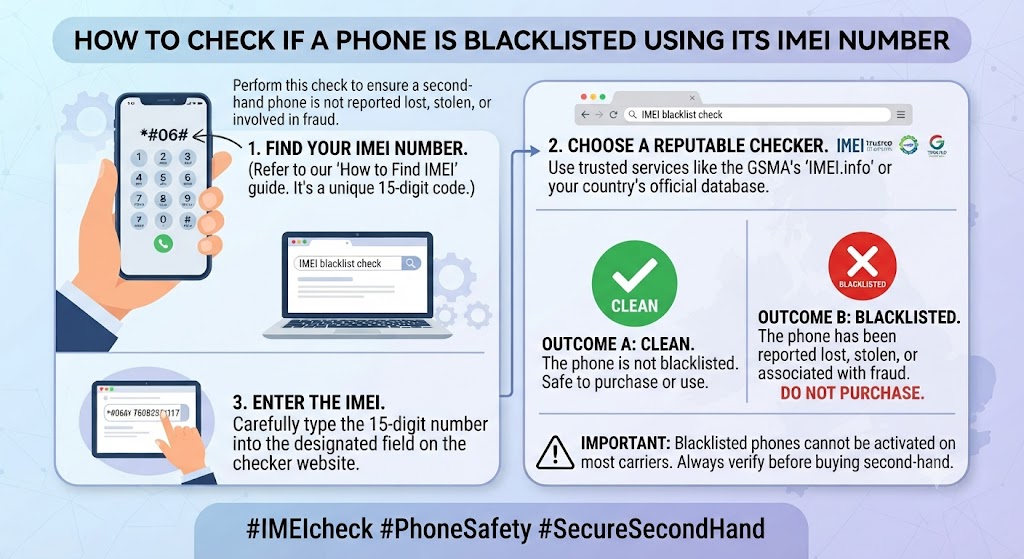
Once you have the phone’s IMEI number, it’s quick and easy to check if the device is blacklisted. An IMEI check helps verify whether the phone has been reported as lost, stolen, or blocked by a mobile network. Spending just a few minutes on this check can protect you from scams and ensure you buy a genuine, fully functional smartphone.
Step 1 – Get the IMEI Number
Use one of the methods above to obtain the phone’s unique IMEI. Never rely solely on the seller’s description – always verify the number yourself whenever possible.
Step 2 – Use a Trusted IMEI Checking Service
Enter the IMEI into a reputable IMEI checker. A good checker will tell you whether the phone is:
- Blacklisted
- Reported lost
- Reported stolen
- Network blocked
- Carrier locked
- Still under finance (where supported)
This is one of the easiest ways to protect yourself before making a purchase.
Step 3 – Verify the Device Details
Compare the IMEI results with the phone you’re buying. Check that the report matches:
- Brand
- Model
- Colour
- Storage capacity
If anything doesn’t match, don’t continue with the purchase.
Step 4 – Inspect the Phone
Even if the IMEI is clean, inspect the phone carefully for:
- Screen damage
- Battery condition
- Camera performance
- Charging port
- Face ID or fingerprint sensor
- Speaker quality
- Water damage indicators
Buying from a professional refurbished retailer means these checks have already been completed before the phone goes on sale.
Step 5 – Buy from a Trusted Seller
The safest option is to purchase from a reputable refurbished retailer that performs:
- IMEI verification
- Full diagnostic testing
- Battery health checks
- Factory reset
- Quality inspection
- Warranty support
At iExpert Market, every refurbished device is professionally tested, IMEI checked, and backed by a 12-month warranty, giving customers confidence that they’re purchasing a genuine, fully functional smartphone rather than taking unnecessary risks with unknown private sellers.
Free Ways to Check an IMEI Before Buying
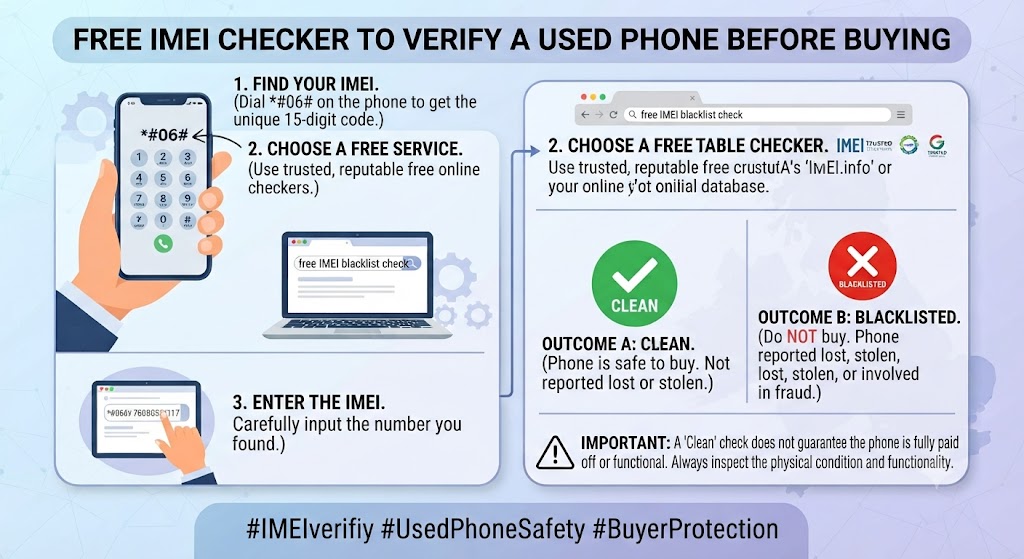
Checking an IMEI before buying a phone doesn’t have to cost anything. Several trusted services allow you to verify whether a device has been reported as lost, stolen, or blacklisted. While some websites offer detailed premium reports, a basic blacklist check is often enough to identify major issues before you hand over your money.
Here are some of the most common ways to check a phone’s status.
1. Use Your Mobile Network’s IMEI Checker
Many UK mobile networks provide tools or customer support that can help verify a phone’s status. Depending on the provider, you may be able to confirm whether the device has been blocked on their network or obtain guidance on its eligibility for use.
If you’re buying a phone originally sold through a specific carrier, checking directly with that network can provide additional peace of mind.
2. Use a Trusted Online IMEI Checking Service
Several reputable websites allow you to enter a phone’s IMEI number and receive a report within seconds. A typical IMEI report may include:
- Blacklist status
- Lost or stolen reports
- Device model
- Manufacturer
- Colour
- Storage capacity
- Activation status
- Network information
- Warranty details (where available)
Always use reputable IMEI checking services and avoid websites that request unnecessary personal information or payment before showing basic device details.
3. Ask the Seller to Show the IMEI Check
If you’re meeting the seller in person, ask them to perform the IMEI check in front of you. This helps ensure:
- The IMEI belongs to the phone being sold.
- The seller isn’t providing a different IMEI.
- The report is current.
Honest sellers are usually happy to provide this information.
4. Buy from a Trusted Refurbished Retailer
One of the easiest ways to avoid blacklist problems altogether is to purchase from a reputable refurbished retailer. At iExpert Market, every refurbished phone undergoes professional inspections before being listed for sale, including IMEI verification, functionality testing, and quality assurance. This significantly reduces the risk of buying a blocked or fraudulently obtained device.
If you’re looking for additional buying advice, our Where to Buy Phones in the UK: A Complete Guide to Finding Quality Devices in 2026 explains how to choose a trustworthy retailer.
What Information Does an IMEI Check Show?
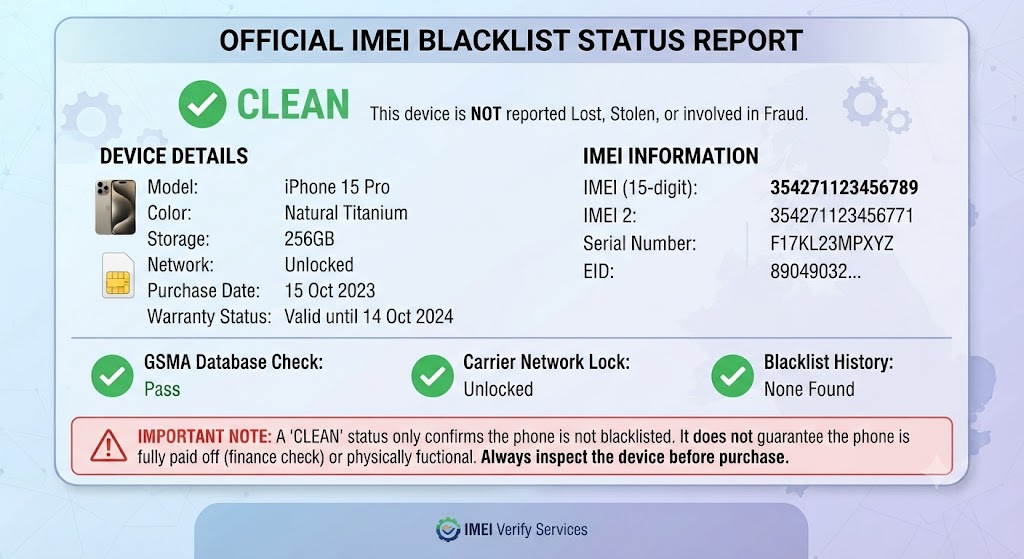
Many buyers think an IMEI check only reveals whether a phone is blacklisted, but it can provide much more useful information. Depending on the service used, an IMEI report may include:
| Information | Why It Matters |
|---|---|
| Blacklist Status | Confirms whether the phone has been blocked by UK networks. |
| Lost or Stolen Report | Helps identify devices reported missing. |
| Device Model | Confirms you’re buying the advertised model. |
| Storage Capacity | Ensures the storage matches the listing. |
| Colour | Helps verify the device hasn’t been misrepresented. |
| Network Lock Status | Shows whether the phone is locked to a specific carrier. |
| Warranty Information | Some services display remaining manufacturer warranty. |
| Activation Status | Useful for checking whether activation locks may exist. |
Reviewing these details helps ensure you’re buying exactly what the seller claims.
What Happens If You Buy a Blacklisted Phone?
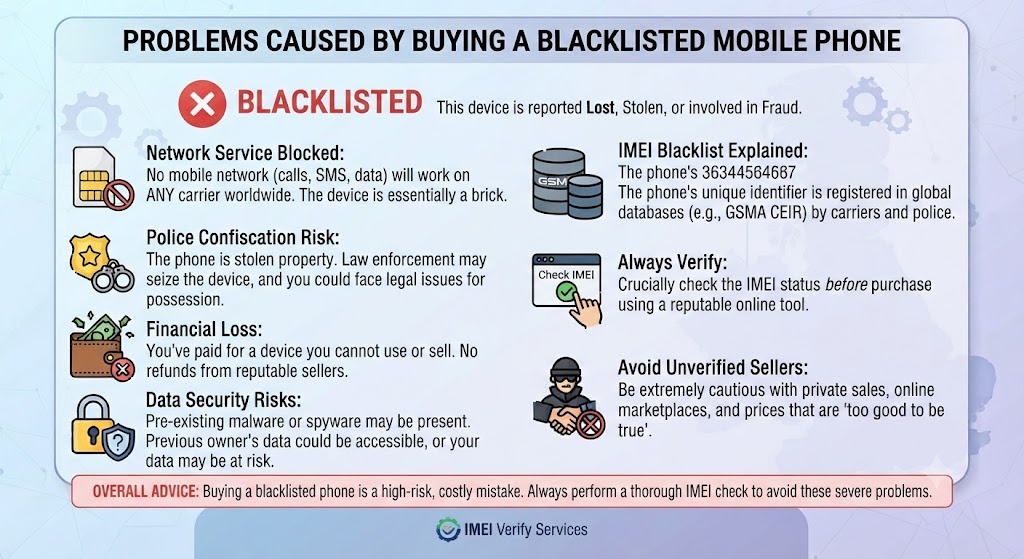
Buying a blacklisted phone can quickly become an expensive mistake. Although the phone may appear to work perfectly when you inspect it, problems often arise once you insert your SIM card.
You could experience:
- No mobile signal
- Inability to make calls
- No text messaging
- Mobile data not working
- Difficulty reselling the phone
- Reduced trade-in value
- Warranty complications
- Financial loss if the seller disappears
If the phone was reported stolen, recovering your money may be extremely difficult, especially when buying privately. This is why many buyers now choose professionally refurbished devices that have already passed comprehensive verification checks.
Can a Blacklisted Phone Be Removed from the Blacklist?
Sometimes—but only under certain circumstances.
If the phone was blacklisted by mistake or has since been recovered after being reported lost, the original owner may be able to request that the network remove it from the blacklist.
However, if the phone:
- Was genuinely stolen
- Was involved in fraud
- Has unresolved contractual issues
the blacklist is unlikely to be removed until the underlying issue has been resolved.
As a buyer, you should never assume that a seller’s promise to “remove the blacklist later” will actually happen.
Until the blacklist has officially been removed by the network, treat the phone as blocked.
Should You Buy a Blacklisted Phone?
For almost every buyer, the answer is no. While blacklisted phones are often advertised at very attractive prices, the potential risks usually outweigh any savings.
Reasons to Avoid Blacklisted Phones
- Limited or no mobile network access
- Difficult to resell later
- Possible legal ownership concerns
- No guarantee the blacklist will ever be removed
- Reduced trade-in value
- Greater chance of scams
Instead of taking unnecessary risks, consider purchasing a professionally refurbished phone that has already been checked and tested.
If you’re comparing your options, our Is It Safe to Buy a Second-Hand iPhone? The Complete UK Buyer’s explains why buying from a trusted refurbished retailer is generally safer than buying from private sellers.
Blacklisted Phone vs Network Locked Phone
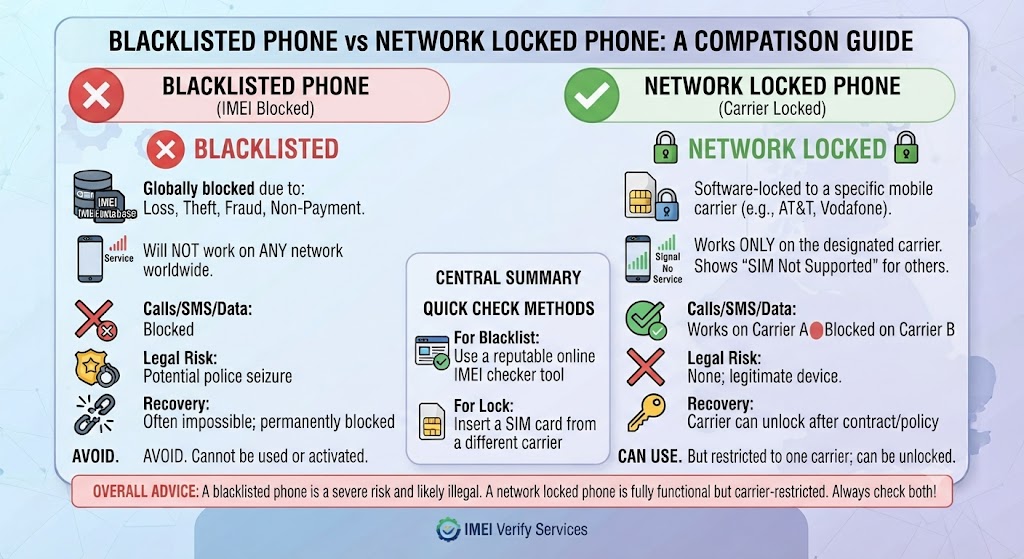
Many buyers confuse a blacklisted phone with a network-locked phone, but they’re completely different.
| Feature | Blacklisted Phone | Network Locked Phone |
|---|---|---|
| Can make calls? | Usually No | Yes (on supported network) |
| Works with any SIM? | No | Only supported carrier |
| Reported lost or stolen? | Often Yes | No |
| IMEI blocked? | Yes | No |
| Can usually be unlocked? | Rarely | Often Yes |
| Safe to buy? | Usually No | Depends on the circumstances |
Understanding this difference can help you avoid unnecessary confusion when buying a used device.
Blacklisted Phone vs Professionally Refurbished Phone
If you’re deciding between a private seller and a trusted refurbished retailer, the differences are significant.
| Feature | Blacklisted Phone | Refurbished Phone from iExpert Market |
|---|---|---|
| IMEI Verified | No guarantee | ✔ Professionally checked |
| Fully Tested | Not always | ✔ Comprehensive diagnostics |
| Warranty | Usually none | ✔ 12-month warranty |
| Battery Checked | Unknown | ✔ Professionally tested |
| Factory Reset | Not guaranteed | ✔ Completed before sale |
| Customer Support | Limited | ✔ Ongoing support |
| Peace of Mind | Low | High |
This is one of the main reasons professionally refurbished phones have become increasingly popular among UK buyers looking for reliable devices at lower prices.
How to Avoid Buying a Blacklisted Phone?
The best way to avoid buying a blacklisted phone is to take a few simple precautions before completing your purchase. Whether you’re buying from an online marketplace, a local seller, or a refurbished retailer, following these steps can save you from costly mistakes.
1. Always Check the IMEI
Never buy a phone without checking its IMEI first. An IMEI check can quickly reveal whether the device has been reported as lost, stolen, or blocked by a mobile network. If a seller refuses to provide the IMEI, consider it a warning sign and look for another device.
2. Buy from a Reputable Seller
Where you buy your phone matters just as much as the phone itself. Trusted refurbished retailers inspect every device before it is listed for sale, helping reduce the risk of purchasing blacklisted or faulty phones.
If you’re unsure where to shop, read our Where to Buy Cheap Used Phones in the UK? guide to compare the safest places to buy quality devices.
3. Verify the Phone’s Condition
Before making payment, inspect the phone carefully. Check:
- Screen condition
- Cameras
- Speakers
- Charging port
- Buttons
- Face ID or fingerprint sensor
- Battery performance
- SIM card detection
A phone may not be blacklisted but could still have hidden hardware problems.
4. Confirm the Phone Isn’t Activation Locked
For iPhones, ensure Find My iPhone has been removed. For Android devices, confirm the previous owner’s Google account has been signed out. Activation locks are separate from blacklisting, but they can still prevent you from setting up and using the phone.
5. Request Proof of Ownership
Ask for:
- Original receipt
- Order confirmation
- Warranty documents
- Original packaging (if available)
These documents help demonstrate that the phone has been legitimately owned.
6. Avoid Suspicious Deals
Be cautious if:
- The price is unusually low.
- The seller wants immediate payment.
- They refuse to answer questions.
- They insist on cash only.
- They won’t let you inspect the phone.
If something doesn’t feel right, it’s usually better to walk away.
Questions to Ask Before Buying a Used Phone
Before handing over your money, ask the seller these important questions.
1. Is the phone fully paid off?
Outstanding finance can sometimes create complications later.
2. Has the phone ever been repaired?
Knowing whether the phone has undergone repairs helps you understand its history.
3. Can I see the IMEI number?
Always compare the IMEI on the phone with the one on the box (if available).
4. Is the phone unlocked?
An unlocked phone gives you the freedom to choose any UK mobile network. If you’re unsure what this means, our guide What Is a SIM Free Phone? explains the benefits of unlocked devices.
5. Has the phone ever been reported lost or stolen?
While the seller’s answer shouldn’t replace an IMEI check, it’s still an important question to ask.
6. Does everything work properly?
Test:
- Cameras
- Microphones
- Speakers
- Wi-Fi
- Bluetooth
- Charging
- Face ID or fingerprint scanner
Professional refurbished retailers perform these checks before selling the device.
Why Buying a Refurbished Phone Is Often the Safer Choice
Many people compare used phones with refurbished phones, but there’s an important difference. A used phone is usually sold exactly as the previous owner left it, often without professional testing or warranty.
A professionally refurbished phone, however, is inspected, tested, cleaned, and restored before being offered for sale.
Why Buy Your Refurbished Phone from iExpert Market?
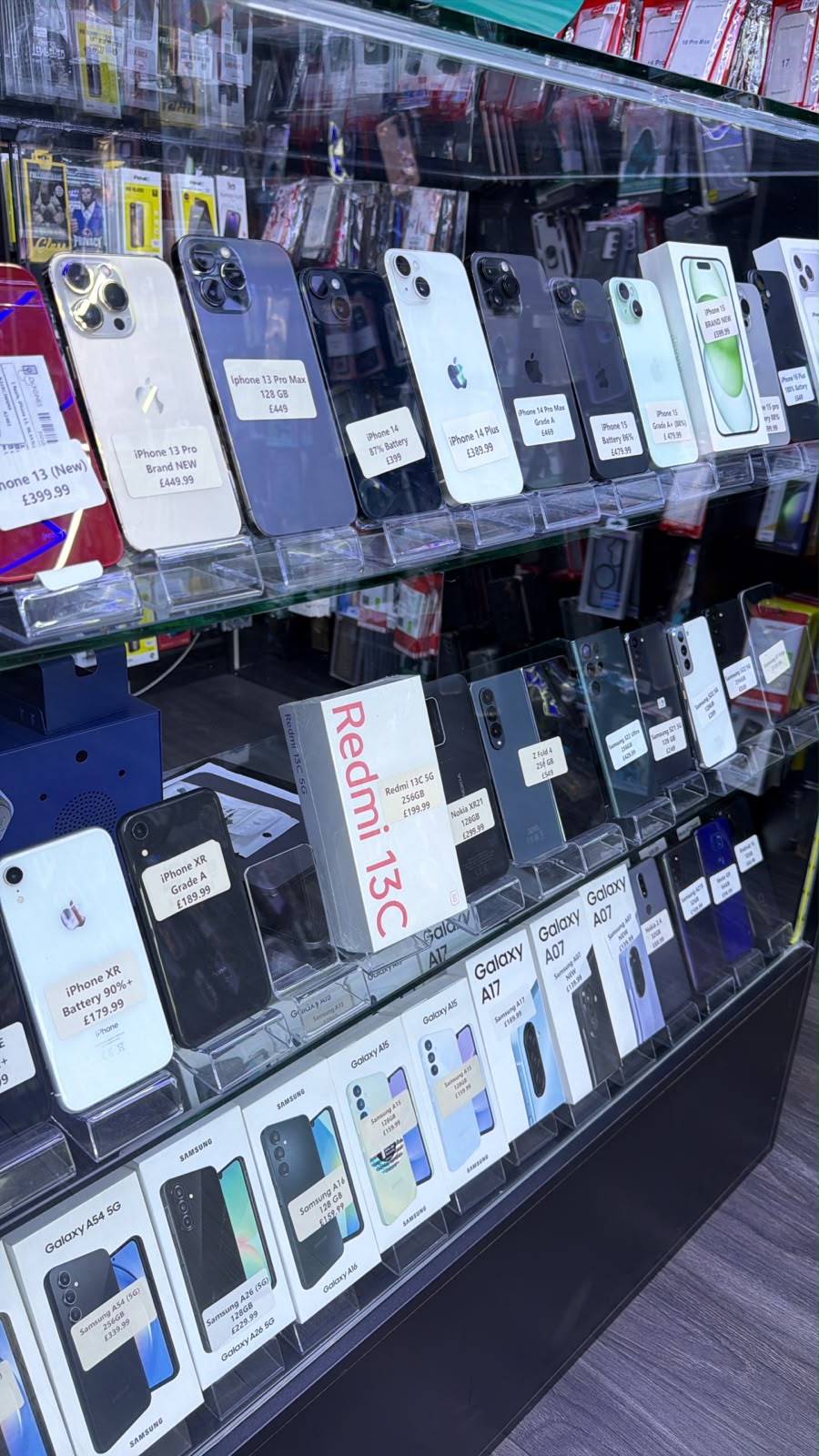
At iExpert Market, we understand that buying a phone online requires trust. That’s why every refurbished device goes through a comprehensive inspection process before reaching our customers.
When you buy from iExpert Market, you benefit from:
- Professionally refurbished smartphones
- IMEI verification before sale
- Comprehensive hardware diagnostics
- Battery health testing
- Secure factory reset
- SIM-free and unlocked devices
- Certified quality inspections
- 12-month warranty
- Fast UK delivery
- Friendly customer support
Whether you’re shopping for the latest iPhone, a Samsung Galaxy device, or another premium smartphone, you can buy with confidence knowing every device has been carefully checked for quality and reliability.
Browse our latest collections:
Our goal is simple – help UK customers enjoy premium technology at affordable prices without the risks often associated with buying from private sellers.
Final Verdict
If you’re buying a used or refurbished smartphone, checking whether the phone is blacklisted should always be your first step. Spending just a few minutes verifying the device’s IMEI can help you avoid stolen phones, network restrictions, fraud, and unexpected costs. It’s a simple precaution that can save you money and give you confidence in your purchase.
While buying from private sellers may seem like a cheaper option, it often comes with greater risks and fewer protections. Choosing a professionally refurbished phone from a trusted retailer offers far more peace of mind, thanks to comprehensive testing, IMEI verification, quality inspections, warranty coverage, and reliable after-sales support.
At iExpert Market, every refurbished iPhone, Samsung phone, iPad, MacBook, tablet, and laptop is professionally tested, IMEI checked, securely data wiped, and backed by a 12-month warranty. Whether you’re upgrading your current device or purchasing your first refurbished smartphone, you can shop with confidence knowing you’re investing in high-quality, reliable technology that has been carefully inspected by experienced technicians.
If your current device is damaged or experiencing hardware issues, you don’t always need to replace it. iExpert Repairs offers expert repair services for iPhones, Samsung phones, iPads, MacBooks, tablets, and laptops, helping you restore your device with high-quality parts and professional workmanship. Whether you choose a trusted refurbished device from iExpert Market or a professional repair from iExpert Repairs, you’ll benefit from expert service, transparent support, and dependable technology solutions across the UK.
FAQs About Blacklisted Phones and IMEI Checks
1. What is a blacklisted phone?
A blacklisted phone is a device whose IMEI number has been blocked by a mobile network after being reported as lost, stolen, involved in fraud, or affected by certain contractual issues. Once blacklisted, the phone may no longer connect to supported mobile networks.
2. How can I check if a phone is blacklisted before buying?
The easiest way is to find the phone’s IMEI number and use a trusted IMEI checking service. The report will show whether the phone has been blacklisted, reported lost or stolen, or has other network restrictions.
3. How do I find the IMEI number on a phone?
You can dial *#06#, check Settings > About Phone, look on the SIM tray, or find it on the original box. Every phone has a unique 15-digit IMEI number.
4. Can I check a phone’s IMEI for free?
Yes. Several trusted IMEI checking services offer free basic reports that show whether a phone is blacklisted. Some providers also offer premium reports with additional device information.
5. What happens if I buy a blacklisted phone?
A blacklisted phone may not connect to UK mobile networks, making it impossible to make calls, send texts, or use mobile data. It can also be difficult to resell or trade in.
6. Can a blacklisted phone still use Wi-Fi?
Yes. In most cases, a blacklisted phone can still connect to Wi-Fi, browse the internet, stream videos, and use apps, but mobile network services usually remain blocked.
7. Can a factory reset remove a blacklist?
No. A factory reset only deletes personal data and restores the phone to its default settings. The blacklist is linked to the IMEI number and remains in place until removed by the mobile network.
8. Can a blacklisted phone become unblacklisted?
Sometimes. If the phone was reported lost and later recovered or blacklisted by mistake, the original owner may be able to request removal from the blacklist through their network provider.
9. Is it illegal to buy a blacklisted phone?
Buying a blacklisted phone isn’t automatically illegal, but purchasing a phone that has been stolen could lead to legal issues. Always verify the IMEI before completing a purchase.
10. What’s the difference between a blacklisted phone and a network-locked phone?
A blacklisted phone is blocked from mobile networks because of its IMEI status, while a network-locked phone works normally but is restricted to a specific carrier until it is unlocked.
11. Can a blacklisted phone be sold legally?
A seller should clearly disclose if a phone is blacklisted. Selling a blacklisted phone as a fully working device without informing the buyer may breach consumer protection laws.
12. Do refurbished phones come blacklisted?
No. Reputable retailers like iExpert Market professionally inspect and verify the IMEI of every refurbished phone before it is sold, reducing the risk of customers receiving a blacklisted device.
13. Is buying a refurbished phone safer than buying a used phone?
Yes. Professionally refurbished phones are tested, cleaned, IMEI checked, and backed by a warranty. Used phones sold privately may not include these quality checks or after-sales support.
14. Can a phone be blacklisted after I buy it?
Although uncommon, it can happen if the previous owner reports the device as lost or stolen after selling it or if there are unresolved contractual issues. Buying from a trusted retailer helps reduce this risk.
15. Will a blacklisted phone work in another country?
Some blacklisted phones may work outside the country where they were blacklisted, but many international networks now share blacklist databases. Always check before purchasing.
16. How can I avoid buying a blacklisted phone?
Always check the IMEI number, inspect the device carefully, ask for proof of purchase, verify activation locks have been removed, and buy from a trusted refurbished phone retailer whenever possible.
17. Can police track a blacklisted phone?
Law enforcement agencies may use the IMEI number during investigations, but blacklisting itself does not mean the phone is actively being tracked.
18. Does a blacklisted phone have any resale value?
A blacklisted phone usually has significantly lower resale value because it cannot be used normally on supported mobile networks. Most buyers avoid purchasing blacklisted devices.
19. Why should I buy a refurbished phone from iExpert Market?
Every refurbished phone from iExpert Market is professionally tested, IMEI verified, factory reset, and backed by a 12-month warranty, giving customers confidence that they’re purchasing a reliable, high-quality device.
20. What should I check before buying a second-hand phone?
Before buying any second-hand phone, check the IMEI status, verify the phone isn’t activation locked, inspect the hardware, test key features, confirm proof of ownership, and ensure you’re buying from a reputable seller or trusted refurbished retailer. These simple steps can help you avoid scams and costly mistakes.
Final Thoughts
Knowing how to check if a phone is blacklisted before buying is an essential part of making a safe and informed purchase. Spending just a few minutes checking the phone’s IMEI number can help you avoid stolen devices, network restrictions, fraud, and unexpected repair or replacement costs. Whether you’re buying a used or refurbished smartphone, verifying the device’s history before making payment is one of the best ways to protect your investment.
At iExpert Market, we believe every customer deserves complete confidence when buying refurbished technology. That’s why every refurbished iPhone, Samsung phone, iPad, MacBook, tablet, and laptop is professionally inspected, IMEI verified, securely data wiped, fully tested for functionality, and backed by our 12-month warranty. Our experienced team follows strict quality control procedures to ensure every device meets high performance and reliability standards before it reaches our customers.
Buy with Confidence from iExpert Market
Choosing a trusted refurbished retailer means you don’t have to worry about hidden issues such as blacklisted devices, activation locks, or undisclosed faults. Whether you’re upgrading to the latest iPhone, switching to a Samsung Galaxy device, or shopping for a refurbished iPad or MacBook, iExpert Market offers affordable, high-quality technology that’s been professionally restored and thoroughly tested, giving you complete peace of mind.
Back to posts