Is It Safe to Buy a Second Hand iPad?
Yes – buying a second hand iPad can be a safe and cost-effective choice, provided you purchase from a trusted seller and know what to look for before handing over your money.
Apple iPads are designed to last for years, which is why they’re among the most popular pre-owned devices in the UK. Whether you’re a student looking for an affordable tablet, a professional who needs a reliable device for work, or a parent buying an iPad for your child, choosing second hand can save you hundreds of pounds without sacrificing everyday performance.
However, not every used iPad offers the same value. Some devices have hidden issues such as poor battery health, cracked internal components, water damage, or Activation Lock, while others have been professionally inspected, fully tested, and prepared for their next owner.
Understanding the difference between a privately sold used iPad and a professionally refurbished device is essential before making your purchase. If you’re unfamiliar with the refurbishment process, our guide explaining What Does Refurbished Mean? provides a helpful overview of how refurbished devices differ from standard second hand products.
In this complete UK buyer’s guide, you’ll learn how to identify a safe second hand iPad, avoid common buying mistakes, compare your purchasing options, and decide whether buying used is the right choice.
Why Are More People Buying Second Hand iPads?
The way people buy technology has changed significantly over the past few years. Instead of replacing devices every time Apple launches a new model, many UK buyers now focus on getting the best value for their money.
Thanks to Apple’s long software support, powerful processors, and excellent build quality, many older iPads continue to perform exceptionally well for everyday tasks. This means you don’t always need the latest model to enjoy a fast, reliable, and enjoyable user experience.
Choosing a second hand iPad allows buyers to access premium Apple technology at a much lower price while also reducing unnecessary electronic waste. It’s a practical decision that benefits both your wallet and the environment.
Why Apple’s iPads Hold Their Value So Well
Unlike many budget tablets that begin slowing down after only a few years, iPads are known for their long lifespan.
Apple continues providing iPadOS updates to supported devices for many years, allowing even older generations to remain secure, responsive, and compatible with modern apps. Combined with premium aluminium construction, reliable processors, and high-quality Retina displays, this makes second hand iPads one of the safest technology purchases available.
For many buyers, an iPad that’s only two or three generations old still delivers more than enough performance for browsing, streaming, note-taking, online learning, video calls, office work, and creative tasks.
If you’re unsure which generation best suits your needs, our guide covering The Evolution of Apple iPad: From 1st Generation to the Latest Models explores every model, helping you compare features, performance, and value before buying.
Second Hand vs Refurbished iPad: What’s the Real Difference?
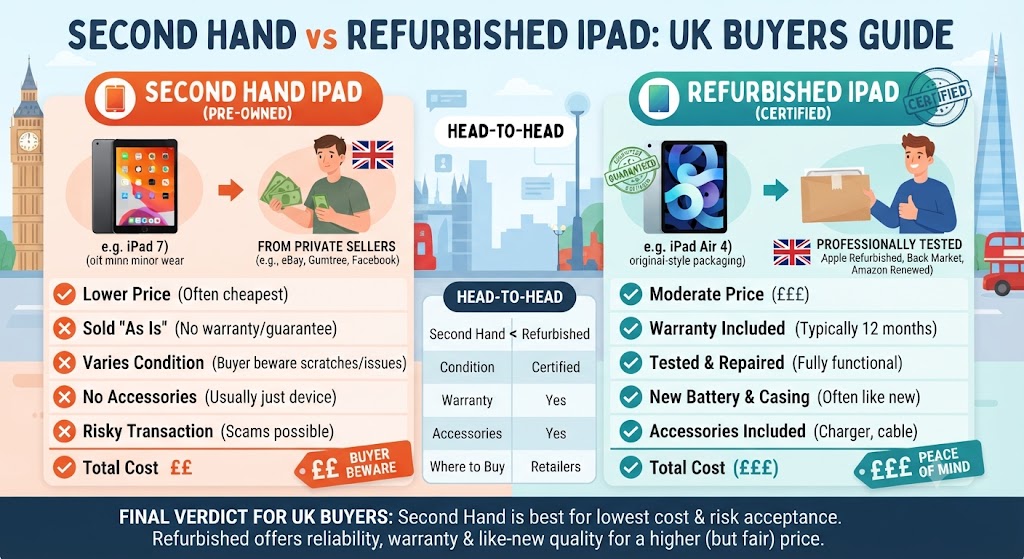
One of the biggest misunderstandings among buyers is assuming that second hand and refurbished mean exactly the same thing. Although both devices have had a previous owner, the buying experience can be very different.
A second hand iPad is typically sold in its current condition by an individual owner or marketplace seller. In many cases, the device hasn’t undergone any professional inspection, hardware testing, or quality checks before being listed for sale. As a result, its reliability depends entirely on how well the previous owner looked after it.
A professionally refurbished iPad, on the other hand, is carefully inspected by trained technicians before it becomes available for sale. Depending on the retailer’s refurbishment standards, the device may undergo cosmetic cleaning, hardware diagnostics, battery assessment, software verification, secure data wiping, and comprehensive functionality testing to ensure it performs as expected.
| Feature | Second Hand iPad | Professionally Refurbished iPad |
|---|---|---|
| Previous Owner | ✔ | ✔ |
| Professionally Tested | Usually No | ✔ |
| Cosmetic Inspection | Rarely | ✔ |
| Hardware Diagnostics | Not Guaranteed | ✔ |
| Secure Data Wipe | May Not Be Completed | ✔ |
| Battery Assessment | Unlikely | ✔ |
| Warranty | Rarely Included | Usually Included |
| Return Policy | Limited | Often Available |
| Peace of Mind | Depends on Seller | Significantly Higher |
For buyers who want greater confidence, choosing a professionally refurbished iPad often reduces many of the risks associated with purchasing privately.
Is Buying a Second Hand iPad Worth It?
For most people, yes.
A carefully chosen second hand iPad offers excellent value because Apple’s hardware is built with longevity in mind. Even models released several years ago remain capable of handling daily activities such as web browsing, video streaming, online learning, digital note-taking, emails, and productivity apps.
Rather than spending full retail price on the newest model, many buyers choose an earlier generation with similar real-world performance at a considerably lower cost. This allows them to enjoy premium Apple quality while keeping more money in their budget.
For example, many students continue choosing the iPad 9th Generation, while professionals often find the iPad Air and earlier iPad Pro models provide more than enough power for work and creative projects. Buyers interested in comparing the latest Apple tablets before making a decision may also find our What Is the Latest iPad? useful for understanding how the newest models compare with older generations.
The Biggest Benefits of Buying a Second Hand iPad
Purchasing a second hand iPad isn’t simply about saving money. When you buy wisely, you can enjoy many of the same advantages as a new device while paying significantly less.
Some of the biggest benefits include:
- Lower purchase price compared with buying new
- Access to premium Apple hardware within a smaller budget
- Excellent long-term software support through iPadOS updates
- Strong resale value compared with many Android tablets
- Reliable performance for study, work, entertainment, and creativity
- A more environmentally responsible alternative to buying brand-new technology
For many UK buyers, these advantages make purchasing a second hand or professionally refurbished iPad one of the smartest technology investments available today.
What Are the Risks of Buying a Second Hand iPad?
Although buying second hand is generally safe, it’s important to understand the potential risks before committing to a purchase. Some of the most common problems include:
- A battery that no longer holds charge efficiently
- Activation Lock still linked to the previous owner’s Apple ID
- Hidden water damage that isn’t immediately visible
- Display defects or touch screen issues
- Charging port problems
- Non-genuine replacement parts
- No warranty or after-sales support
- Misleading descriptions from private sellers
The good news is that almost all of these risks can be significantly reduced by carrying out a few simple checks before buying. In the next section, we’ll explain exactly how to inspect a second hand iPad like an expert, what warning signs to watch for, and which checks every UK buyer should complete before making a purchase.
How to Inspect a Second Hand iPad Before Buying?
A second hand iPad might look like an excellent bargain, but appearances don’t always tell the full story. A device that looks almost new could still have hidden faults, while another with minor cosmetic wear may perform perfectly for years.
Before buying any used iPad, it’s worth spending a few minutes checking its condition. These simple inspections can help you avoid unexpected repair costs and ensure you’re paying a fair price.
1. Examine the Overall Physical Condition
Start with a careful visual inspection of the iPad. Normal signs of use, such as light scratches or minor scuffs, are common and usually don’t affect performance. However, significant physical damage may indicate the device has been dropped or improperly repaired.
Pay particular attention to:
- Cracks in the display
- Bent aluminium frame
- Loose or damaged buttons
- Charging port condition
- Speaker and microphone grills
- Camera lenses
- Deep dents around the corners
- Signs of water exposure
Minor cosmetic marks are generally acceptable, but structural damage should always raise concerns.
2. Test the Display and Touchscreen
The display is one of the most expensive components to replace, making it one of the most important parts to inspect. Open several apps and interact with different areas of the screen to ensure everything responds smoothly.
Check for:
- Dead pixels
- Uneven brightness
- Screen flickering
- Touch response across the entire display
- Colour discolouration
- Light bleeding around the edges
- Ghost touches
A high-quality Retina display should appear bright, sharp, and responsive without any noticeable defects.
3. Check Battery Performance
Unlike iPhones, iPads don’t display an official battery health percentage in the Settings app. This means buyers need to judge battery condition through normal usage.
Warning signs include:
- Battery draining unusually fast
- Slow charging
- Unexpected shutdowns
- Excessive heat during everyday tasks
- Battery swelling or a slightly lifted display
A weak battery can reduce the overall value of a second hand iPad.
When purchasing from a reputable refurbished retailer, battery performance is typically assessed as part of the refurbishment process to ensure the device provides dependable everyday use. If battery reliability is important to you, it’s worth comparing second hand devices with professionally restored alternatives. Our guide on Are Refurbished iPads Worth Buying? explains why many buyers choose refurbished models for greater long-term confidence.
4. Make Sure Activation Lock Has Been Removed
Activation Lock is one of Apple’s most important security features. If the previous owner hasn’t removed their Apple ID, you won’t be able to activate or use the iPad after purchase. Before completing the transaction, confirm that:
- The previous owner has signed out of iCloud.
- Find My iPad has been disabled.
- The iPad has been erased and reset.
- You can complete the setup process without being asked for another person’s Apple ID.
If Activation Lock remains enabled, it’s best to walk away from the purchase.
5. Verify the Serial Number
Every genuine iPad has a unique serial number that can help confirm its identity.
Navigate to:
Settings > General > About
Compare the serial number with:
- The original box (if available)
- Purchase documentation
- The information shown during setup
If the numbers don’t match or the seller is unwilling to provide them, proceed with caution.
6. Test Every Essential Feature
Never assume everything works simply because the iPad powers on. Spend a few minutes checking all major functions, including:
- Wi-Fi connectivity
- Bluetooth
- Front and rear cameras
- Speakers
- Microphones
- Charging port
- Volume buttons
- Power button
- Auto-rotation
- Touch ID or Face ID (where supported)
These quick checks can reveal faults that may not be obvious during a casual inspection.
Second Hand iPad Inspection Checklist
| Item to Check | Why It Matters |
|---|---|
| Display | Confirms there are no screen defects or touch issues. |
| Battery Performance | Helps identify reduced battery life or charging problems. |
| Cameras | Ensures both cameras function correctly. |
| Speakers & Microphone | Verifies clear sound for calls, videos, and media playback. |
| Buttons | Confirms all physical controls operate as expected. |
| Charging Port | Prevents future charging or connectivity issues. |
| Activation Lock | Ensures the iPad can be activated by its new owner. |
| Serial Number | Helps verify authenticity and ownership details. |
Completing this checklist before purchasing can help you avoid many of the common problems associated with second hand devices.
Where Is the Best Place to Buy a Second Hand iPad?
Where you buy your iPad is just as important as which model you choose. Private sellers may offer attractive prices, but they rarely provide warranties, return policies, or proof that the device has been professionally inspected.
Buying from a trusted retailer generally offers greater peace of mind because the iPad has usually been tested and prepared for resale.
| Seller | Warranty | Professional Testing | Return Policy | Overall Risk |
|---|---|---|---|---|
| Private Seller | Rarely Included | No | Limited | High |
| Online Marketplace | Varies | Depends on the Seller | Varies | Medium |
| Certified Refurbished Retailer | Usually Included | Comprehensive Testing | Usually Available | Low |
Many UK buyers now prefer certified refurbished retailers because they combine competitive pricing with additional consumer protection.
If you’re still deciding between buying privately or choosing a professionally restored device, our guide on Refurbished vs Second-Hand Phones: What’s the Difference? explains why refurbishment has become the preferred option for many people looking for reliable pre-owned technology.
Which Second Hand iPad Offers the Best Value?
The ideal iPad depends on your budget and how you intend to use it. Some older models continue to deliver excellent performance despite costing significantly less than the latest releases.
| User Type | Recommended iPad |
|---|---|
| Students | iPad 9th Generation |
| Everyday Home Users | iPad 10th Generation |
| Frequent Travellers | iPad mini 6 |
| Creative Professionals | iPad Pro (M1 or Later) |
| Productivity & Multitasking | iPad Air (M1, M2 or M3) |
| Best Overall Value | iPad Air 5th Generation |
If you’re unsure whether an older generation is still worth buying, read our guide What Is the Latest iPad? to see how the newest models compare with previous releases before deciding which offers the best value.
Why Buying from a Trusted Refurbished Retailer Matters
Price is important, but reliability matters even more. Buying from a reputable refurbished retailer helps reduce many of the uncertainties associated with second hand technology. Professionally refurbished devices are typically inspected, tested, securely data wiped, and prepared for resale before reaching the customer.
At iExpert Market, customers can choose from a wide selection of Refurbished iPads, including standard iPad models, iPad Air, iPad mini, and iPad Pro devices. Every eligible device is professionally checked and backed by a 12-month warranty, giving buyers greater confidence than many private marketplace purchases.
Whether you’re upgrading your current tablet or buying your first iPad, choosing a trusted retailer can make the buying experience significantly safer and more reliable.
Common Mistakes to Avoid When Buying a Second Hand iPad
Buying a second hand iPad can save you a significant amount of money, but many buyers end up regretting their purchase because they focus only on the price. A deal that looks too good to be true often comes with hidden problems that aren’t immediately obvious.
Avoiding a few common mistakes can help you find a reliable device that offers excellent value for years to come.
1. Buying Solely Based on the Lowest Price
Everyone wants to save money, but choosing the cheapest iPad available isn’t always the smartest decision. A very low price may indicate:
- Hidden hardware faults
- Poor battery performance
- Previous water damage
- Activation Lock issues
- Non-genuine replacement parts
- Missing accessories or documentation
Instead of looking for the cheapest option, focus on the best overall value by considering the iPad’s condition, age, warranty, and the reputation of the seller.
2. Ignoring the Device’s Age
Many buyers assume that every iPad performs the same, but older models may no longer receive software updates or support newer applications. Before purchasing, consider:
- Release year
- Processor generation
- Remaining software support
- Storage capacity
- Battery condition
3. Overlooking Storage Capacity
Storage is something many buyers regret after making a purchase.
Choosing a 32GB model may seem like a good way to save money, but it can quickly become restrictive if you regularly install apps, download files, or store photos and videos. Think about how you’ll use your iPad before deciding between 64GB, 128GB, 256GB, or larger storage options.
4. Forgetting to Check Warranty Cover
A warranty can make a significant difference if something goes wrong after your purchase. Many privately sold iPads are offered without any after-sales support, meaning you’ll be responsible for repair costs if a fault develops shortly after buying.
Professionally refurbished devices are often supplied with warranty protection, giving buyers additional confidence and support.
5. Not Researching the Seller
Even a genuine iPad can become a poor purchase if it’s bought from an unreliable seller. Before buying, check:
- Customer reviews
- Return policy
- Warranty information
- Business reputation
- Years of trading
- Contact details
Buying from an established retailer generally provides a much safer experience than purchasing from an unknown individual.
Is a Second Hand iPad Suitable for You?
A second hand iPad isn’t just for people trying to spend less. It can be an excellent choice for a wide range of users, provided you choose the right model.
1. Students
Students often need a reliable device for:
- Taking notes
- Online lectures
- Research
- Microsoft Office
- Google Workspace
- Educational apps
For most students, an iPad 9th or 10th Generation offers an excellent balance of affordability and performance.
2. Professionals
Professionals who regularly travel or work remotely can benefit from:
- Email management
- Video conferencing
- Document editing
- Cloud storage
- Presentation software
For heavier workloads, an iPad Air or iPad Pro generally provides better multitasking performance.
3. Families
Parents often purchase second hand iPads for:
- Children’s learning
- Streaming
- Games
- Video calls
- Homework
Buying second hand makes it easier to equip multiple family members without exceeding your budget.
4. Creative Users
Graphic designers, artists, photographers, and video editors often choose iPad Pro or iPad Air models because they support Apple Pencil and deliver impressive processing power for creative applications.
Should You Buy a Second Hand iPad or a Refurbished One?
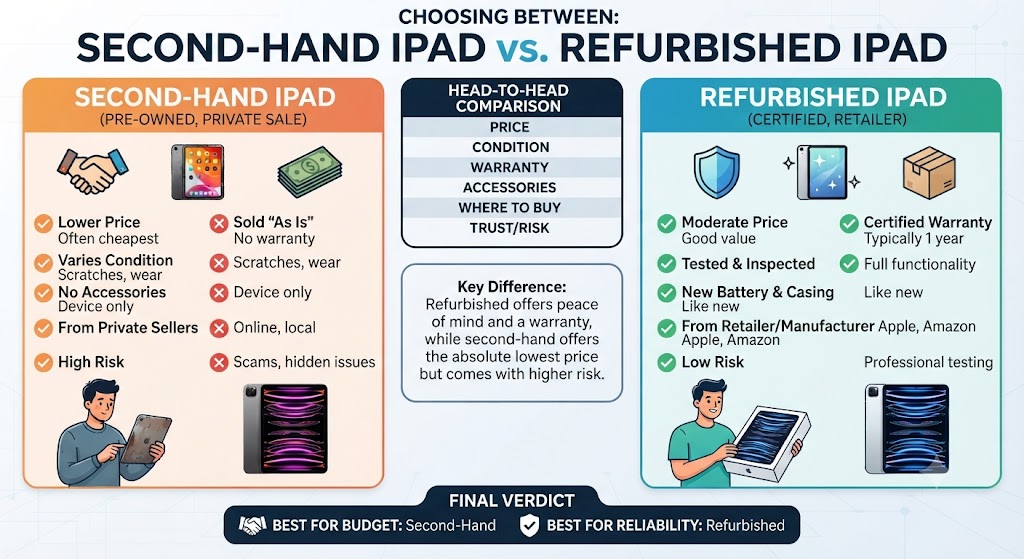
This is one of the most common questions buyers ask. While both options can save money, they don’t provide the same level of reassurance.
| Feature | Second Hand iPad | Refurbished iPad |
|---|---|---|
| Lower Purchase Price | Usually | Often Competitive |
| Professional Testing | Not Guaranteed | Yes |
| Quality Inspection | Rarely | Yes |
| Secure Data Wipe | Not Always | Yes |
| Warranty | Rarely | Usually Included |
| Return Policy | Limited | Usually Available |
| Peace of Mind | Depends on the Seller | Significantly Higher |
If your priority is paying the lowest possible price, a second hand iPad may be suitable. However, if you want greater confidence, warranty protection, and professional quality checks, a refurbished iPad is usually the safer long-term investment.
If you’d like to understand the refurbishment process in more detail, our guides on What Does Refurbished Mean? explain why professionally restored devices continue to grow in popularity across the UK.
Expert Tips for Buying a Second Hand iPad
After inspecting thousands of Apple devices, the iExpert Market Technical Team recommends following these best practices before making a purchase.
- Research the iPad model before agreeing on a price.
- Compare prices from several reputable sellers.
- Avoid deals that appear unusually cheap.
- Check the display, cameras, speakers, charging port, and buttons.
- Confirm that Activation Lock has been removed.
- Verify the serial number where possible.
- Ask about previous repairs or replacement parts.
- Choose a retailer that offers warranty protection and a clear returns policy.
- Consider future software support instead of focusing only on today’s price.
- Buy the newest model your budget comfortably allows.
Following these simple recommendations can help you avoid many of the issues commonly associated with second hand technology.
Is It Safe to Buy a Second Hand iPad? Final Verdict
So, is it safe to buy a second hand iPad? Yes – provided you buy carefully and choose a trusted seller. Apple iPads are built to last, making them one of the safest pre-owned devices available. A well-maintained second hand iPad can continue delivering excellent performance for study, work, entertainment, and everyday use for many years.
The key is knowing what to check before buying. Inspecting the device, verifying that Activation Lock has been removed, assessing its overall condition, and purchasing from a reputable seller can significantly reduce the risks. For buyers who want additional peace of mind, professionally refurbished devices offer clear advantages through comprehensive testing, quality assurance, warranty protection, and customer support.
At iExpert Market, you’ll find a carefully selected range of Refurbished iPads, including iPad, iPad Air, iPad mini, and iPad Pro models. Every eligible device is professionally inspected, thoroughly tested, securely data wiped, and backed by a 12-month warranty, helping you enjoy premium Apple technology with confidence while spending considerably less than buying new.
FAQs About Buying a Second Hand iPad
1. Is it safe to buy a second hand iPad?
Yes, buying a second hand iPad is safe if you purchase it from a trusted seller and check the device carefully before buying. Make sure the iPad is free from Activation Lock, works correctly, and has no hidden hardware issues. Buying from a reputable refurbished retailer provides additional peace of mind through professional testing and warranty cover.
2. Is it worth buying a second hand iPad?
Yes. A second hand iPad remains an excellent investment because many models still deliver fast performance, receive software updates, and cost significantly less than buying new. Choosing the right model can help you enjoy premium Apple technology while staying within budget.
3. What should I check before buying a second hand iPad?
Before purchasing, inspect the display, battery performance, cameras, speakers, charging port, buttons, Wi-Fi, Bluetooth, and overall physical condition. You should also confirm that Activation Lock has been removed and the iPad has been reset to factory settings.
4. How do I know if a used iPad is genuine?
You can verify a used iPad by checking its serial number under Settings > General > About and comparing it with Apple’s records and the original packaging if available. Buying from a trusted retailer also reduces the risk of counterfeit or modified devices.
5. Should I buy a second hand iPad or a refurbished iPad?
A second hand iPad is usually cheaper, while a refurbished iPad offers greater reliability because it has been professionally inspected, tested, cleaned, and often includes a warranty. If you value long-term peace of mind, a refurbished iPad is generally the better choice.
6. Do second hand iPads still receive iPadOS updates?
Many second hand iPads continue receiving iPadOS updates for several years after their release. However, software support depends on the model and generation, so it’s worth checking whether the device is still supported before buying.
7. How long can a second hand iPad last?
A well-maintained iPad can easily last between five and seven years, and in many cases even longer. Apple’s premium hardware and extended software support make iPads one of the longest-lasting tablets available.
8. Is battery life important when buying a used iPad?
Absolutely. Battery performance affects the overall user experience. Since iPads don’t display an official battery health percentage, it’s important to test the battery or buy from a retailer that professionally checks battery performance during refurbishment.
9. Can I use Apple Pencil with a second hand iPad?
Yes, provided the iPad model supports Apple Pencil. Different generations are compatible with different Apple Pencil versions, so always check compatibility before making your purchase.
10. Is it safe to buy a second hand iPad online?
Yes, as long as you buy from a reputable retailer or a trusted online marketplace. Before placing an order, review the seller’s ratings, return policy, warranty, and product description to ensure you’re making a safe purchase.
Final Thoughts
Buying a second hand iPad doesn’t have to be a gamble. With the right knowledge and a trusted seller, it can be one of the smartest ways to enjoy Apple’s premium technology without paying the full price of a brand-new device.
The key is to focus on value rather than simply choosing the cheapest option. Checking the iPad’s condition, verifying Activation Lock, assessing battery performance, and buying from a reputable retailer can help you avoid common pitfalls and make a purchase you’ll be happy with for years to come.
If you want even greater peace of mind, a professionally refurbished iPad is often the better choice. With expert testing, quality checks, and warranty protection, you can enjoy the benefits of a pre-owned device while reducing many of the risks associated with buying from private sellers.
Whether you’re a student, professional, creative user, or simply looking for an affordable Apple tablet, taking the time to make an informed decision will ensure you get the best value for your money.
Why Thousands of UK Customers Choose iExpert Market?
At iExpert Market, we’re committed to making refurbished technology more accessible, affordable, and reliable for customers across the UK.
Every eligible refurbished iPad is professionally inspected, thoroughly tested, securely data wiped, and carefully prepared before it becomes available for sale. Our goal is to provide devices that deliver excellent performance while helping customers save money and reduce electronic waste.
When you choose iExpert Market, you benefit from:
- Professionally tested refurbished Apple devices
- Carefully graded products with transparent condition descriptions
- Competitive UK pricing
- 12-month warranty on eligible devices
- Secure UK-wide delivery
- Dedicated customer support before and after your purchase
- A wide selection of Refurbished iPads, iPhones, MacBooks, Tablets, Samsung Phones, and Laptops
Whether you’re upgrading your current device or buying your first Apple product, you can shop with confidence knowing you’re choosing a retailer that values quality, transparency, and customer satisfaction.
Back to posts