How to Check My Phone Battery Health?
Your phone’s battery is one of the most important components of your device. Whether you own an iPhone, Samsung Galaxy, Google Pixel, or another Android smartphone, battery health directly affects performance, charging speed, screen-on time, and the overall lifespan of your phone.
Many people notice that their phone starts losing charge quickly after a year or two of use. Apps may take longer to open, the device may become warmer than usual, or it might unexpectedly shut down even when there’s still battery remaining. These are all common signs that the battery is ageing.
Fortunately, checking your phone’s battery health is easier than most people think. Both Apple and Android offer ways to monitor battery performance, while some manufacturers provide dedicated battery diagnostic tools. Understanding your battery health allows you to identify problems early, extend battery life, and decide whether it’s time for a battery replacement or even an upgrade.
At iExpert Market, we professionally inspect battery health as part of our refurbishment process. Every certified refurbished smartphone is thoroughly tested for battery performance, charging capability, and overall reliability before being made available to customers across the UK. This ensures buyers receive dependable devices backed by quality assurance and a 12-month warranty.
In this complete guide, you’ll learn how to check battery health on iPhones and Android phones, understand what battery health percentages actually mean, recognise warning signs of battery degradation, improve battery lifespan, and know when replacing your battery – or upgrading to a professionally refurbished device – is the smarter choice.
What Is Phone Battery Health?
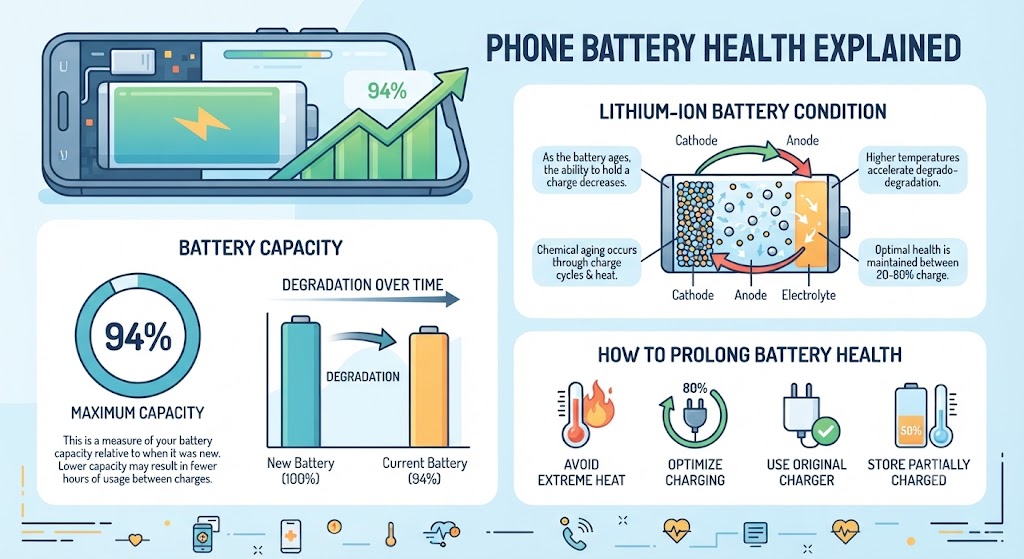
Battery health refers to your phone battery’s ability to hold its original charge compared to when it was brand new.
Every smartphone uses a rechargeable lithium-ion battery, which naturally wears down over time. As the battery ages, its maximum capacity gradually decreases, meaning it cannot store as much energy as it once could.
For example:
| Battery Health | What It Means |
|---|---|
| 100% | Like a brand-new battery |
| 95% | Excellent condition |
| 90% | Very healthy |
| 85% | Good but showing normal wear |
| Below 80% | Battery replacement is often recommended |
Unlike physical damage, battery ageing happens gradually through normal use. Every charging cycle slightly reduces the battery’s maximum capacity.
This process is completely normal and affects every smartphone, regardless of brand.
Why Battery Health Matters?
Many people focus only on how long their phone lasts between charges. However, battery health affects much more than daily battery life.
A healthy battery helps your phone:
- Deliver consistent performance
- Charge efficiently
- Avoid unexpected shutdowns
- Maintain processor performance
- Reduce overheating
- Improve gaming performance
- Extend the overall lifespan of the device
On iPhones, Apple may automatically reduce processor speed if battery health becomes too low in order to prevent unexpected shutdowns. Similarly, Samsung and other Android manufacturers optimise device performance when battery capacity begins to decline.
Poor battery health can also impact:
- Camera performance
- Video recording sessions
- GPS navigation
- Mobile gaming
- Video calls
- Battery charging speed
For anyone planning to buy a refurbished iPhone or refurbished Samsung phone, battery health is one of the most important quality indicators. At iExpert Market, battery testing is a key part of our refurbishment process to ensure customers receive reliable devices that are ready for everyday use.
How Lithium-Ion Phone Batteries Work?
Modern smartphones use lithium-ion batteries because they provide:
- High energy density
- Fast charging support
- Lightweight design
- Long service life
- Better efficiency than older battery technologies
Unlike older nickel-based batteries, lithium-ion batteries do not suffer from the traditional “memory effect.” However, they still experience gradual chemical ageing.
Every complete charging cycle slightly reduces the battery’s maximum capacity. One charging cycle doesn’t necessarily mean charging from 0% to 100%.
For example:
- Charging from 50% to 100% twice equals one full charging cycle.
- Charging from 20% to 70% repeatedly also contributes to total charging cycles over time.
Most modern smartphone batteries are designed to maintain around 80% battery capacity after approximately 500 charging cycles, although actual performance varies depending on the manufacturer and usage habits.
What Causes Battery Health to Decline?

Battery degradation is inevitable, but some habits speed up the ageing process.
1. Frequent Full Charging Cycles
Charging from 0% to 100% every day places more stress on lithium-ion cells than partial charging. Experts generally recommend keeping your battery between 20% and 80% whenever practical.
2. Excessive Heat
Heat is one of the biggest enemies of smartphone batteries. Common causes include:
- Gaming while charging
- Leaving your phone in direct sunlight
- Using fast charging constantly
- Keeping the phone inside a hot car
- Heavy multitasking
High temperatures accelerate chemical ageing and permanently reduce battery capacity.
3. Poor Quality Chargers
Using uncertified chargers or damaged charging cables may result in:
- Inconsistent charging
- Excess heat
- Voltage fluctuations
- Faster battery wear
Using manufacturer-approved or high-quality certified chargers helps protect battery health.
4. Keeping Your Phone at 100% All the Time
Although modern phones manage charging intelligently, leaving your phone plugged in for long periods every day can still increase long-term battery stress. Many newer smartphones now include features like:
- Optimised Battery Charging (Apple)
- Adaptive Battery Protection (Samsung)
- Smart Charging Modes
These features slow charging near 100% to reduce battery ageing.
5. Heavy Gaming and Intensive Apps
High-performance activities generate more heat than normal everyday use. Examples include:
- Mobile gaming
- 4K video recording
- Video editing
- AI processing
- Navigation for long journeys
Heat remains the primary factor accelerating battery degradation.
How to Check Battery Health on an iPhone?
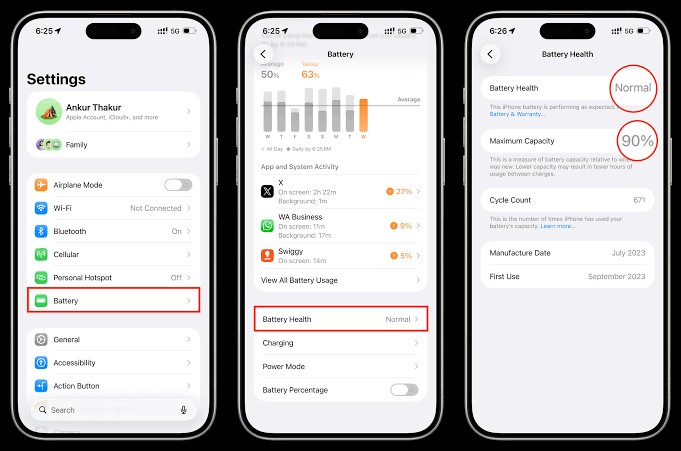
Apple makes checking battery health incredibly simple. Follow these steps:
Step 1
Open Settings.
Step 2
Tap Battery.
Step 3
Select Battery Health & Charging.
You’ll now see several important pieces of information, including:
1. Maximum Capacity
This shows your battery’s current capacity compared with when it was new.
Example:
- 100%
- 96%
- 91%
- 84%
The closer this number is to 100%, the healthier your battery.
2. Peak Performance Capability
Apple also tells you whether the battery can still deliver full performance. Possible messages include:
- Your battery is supporting normal peak performance.
- Performance management has been applied.
- Battery service is recommended.
If your iPhone displays a service recommendation, it usually means battery capacity has fallen below Apple’s recommended threshold.
3. Optimised Battery Charging
This feature learns your charging habits and delays charging beyond 80% until you need your phone. Keeping this enabled can significantly slow battery ageing over time.
Which iPhones Support Battery Health?
Battery Health is available on most modern iPhones, including:
- iPhone SE (2nd Gen and newer)
- iPhone X series
- iPhone 11
- iPhone 12
- iPhone 13
- iPhone 14
- iPhone 15
- iPhone 16
- iPhone 17 series
If you’re considering upgrading, choosing a professionally tested Refurbished iPhone from iExpert Market ensures the device has undergone comprehensive battery checks, giving you confidence in its long-term performance while helping you save compared to buying new.
How to Check Battery Health on Samsung Phones?
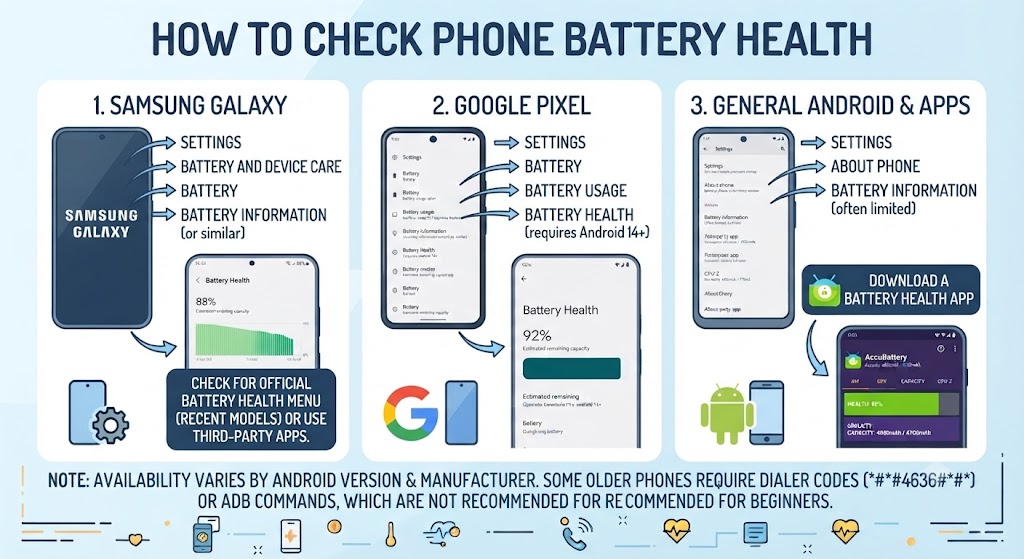
Samsung includes several tools that help users monitor battery condition, although the exact options vary depending on the One UI version and device model.
One of the easiest ways is through the built-in diagnostics feature.
Method 1: Samsung Members App
- Open the Samsung Members app.
- Tap Support.
- Select Phone Diagnostics.
- Choose Battery Status.
The app will analyse your battery and display information about its overall condition, charging performance, and health. This is the most reliable method for recent Galaxy devices, including the Galaxy S, Galaxy Z, and many Galaxy A series phones.
How to Check Battery Health on Other Android Phones
Unlike iPhones, not every Android manufacturer includes a built-in battery health percentage. However, many brands offer battery diagnostics through their settings or support apps.
1. Google Pixel Phones
Google Pixel phones don’t currently display a battery health percentage in the standard Settings app. However, you can:
- Open Settings > Battery
- Review battery usage and optimisation settings
- Use the Pixel Diagnostics tool (available on supported models)
- Check battery condition through authorised service diagnostics
Google continues to improve battery management with features like Adaptive Charging, which learns your charging habits to reduce battery wear over time.
2. OnePlus Phones
Many OnePlus devices include battery protection features such as:
- Battery Health Engine
- Smart Charging
- Optimised Night Charging
These features help slow battery ageing by reducing unnecessary stress during overnight charging.
3. Xiaomi, Redmi & POCO Phones
Depending on the MIUI or HyperOS version, users can:
- Check battery usage statistics
- View charging history
- Enable battery protection features
- Use built-in diagnostics where available
Some models also provide additional battery information through their device care settings.
3. Motorola, Oppo, Vivo & Other Android Brands
Many Android manufacturers now include battery diagnostics inside:
- Device Care
- Phone Manager
- My Device
- Support App
- Device Diagnostics
If your phone doesn’t display battery health directly, a professional battery diagnostic can provide a much more accurate assessment.
Can You Check Battery Health Using Apps?
Many users search for apps that promise to show battery health. Some can estimate battery condition, but it’s important to understand their limitations. Popular battery monitoring apps include:
- AccuBattery
- CPU-Z
- Device Info HW
These apps estimate battery capacity by analysing charging behaviour over time.
What They Can Tell You
- Charging speed
- Battery temperature
- Estimated battery capacity
- Charge cycles
- Battery wear trends
Their Limitations
Third-party apps cannot always access manufacturer-level battery data. As a result:
- Battery percentage estimates may vary.
- Results depend on how long the app has been installed.
- They should not replace professional diagnostics.
For the most reliable information, always use your phone’s built-in diagnostics where available or have the device inspected by qualified technicians.
What Is Considered Good Battery Health?
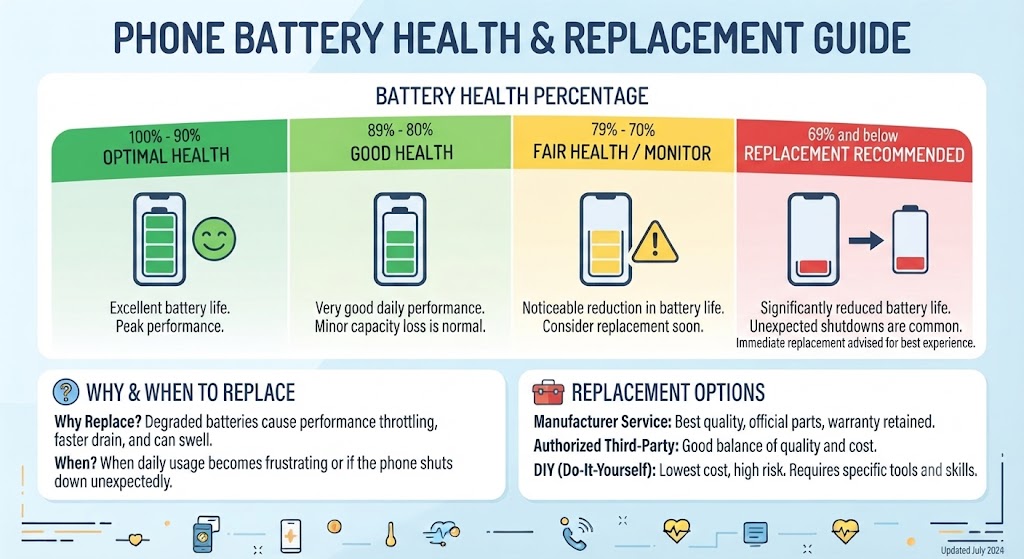
Many people panic when they see their battery health drop below 100%. In reality, some battery degradation is completely normal.
Here’s a general guide.
| Battery Health | Condition | Recommendation |
|---|---|---|
| 100-95% | Excellent | No action needed |
| 94-90% | Very Good | Normal ageing |
| 89-85% | Good | Continue using normally |
| 84-80% | Fair | Monitor battery performance |
| Below 80% | Poor | Consider battery replacement |
Apple recommends replacing the battery once it falls below approximately 80% maximum capacity, as performance and battery life may become noticeably affected.
However, battery health alone isn’t everything. A phone with 82% battery health that lasts all day may still be perfectly suitable for everyday use.
Battery Health vs Battery Life
These two terms are often confused.
1. Battery Health
Battery health measures how much capacity the battery still has compared to when it was new.
Example: A battery with 90% health can store roughly 90% of its original capacity.
2. Battery Life
Battery life refers to how long your phone lasts on a single charge. Battery life depends on several factors:
- Screen brightness
- Background apps
- Signal strength
- Gaming
- Video streaming
- Camera usage
- Processor efficiency
A phone may have excellent battery health but poor battery life if demanding apps consume excessive power.
Signs Your Phone Battery Needs Replacing
Battery degradation usually happens gradually. Watch for these warning signs.
1. Rapid Battery Drain
If your phone loses 20-30% battery after only a short period of normal use, the battery may be deteriorating.
2. Unexpected Shutdowns
Does your phone suddenly switch off at:
- 25%
- 18%
- 12%
This often indicates an ageing battery that can no longer provide stable voltage.
3. Slow Charging
A healthy battery should charge consistently. Very slow charging may indicate:
- Battery wear
- Faulty charging port
- Damaged charger
- Software issues
4. Overheating
If your phone becomes unusually hot during:
- Charging
- Gaming
- Video calls
- Everyday use
The battery may be struggling to operate efficiently.
5. Swollen Battery
A swollen battery is a serious safety issue. Signs include:
- Screen lifting
- Back cover separating
- Phone rocking on a flat surface
Stop using the device immediately and seek professional assistance.
Expert Tips to Improve Battery Health
Although battery ageing is unavoidable, good charging habits can significantly slow the process.
1. Keep Your Battery Between 20% and 80%
Avoid letting your battery reach 0% regularly. Likewise, keeping it at 100% continuously increases long-term stress. Partial charging is generally healthier for lithium-ion batteries.
2. Avoid Excessive Heat
Heat is the biggest cause of battery degradation. Try to avoid:
- Charging under pillows
- Leaving phones in direct sunlight
- Gaming while charging
- Hot cars during summer
3. Use Certified Chargers
Cheap chargers may deliver unstable power. Whenever possible, use:
- Original manufacturer chargers
- Certified USB-C accessories
- Quality cables
4. Keep Software Updated
Software updates often include:
- Battery optimisation
- Charging improvements
- Thermal management
- Performance fixes
Keeping your device updated helps maximise battery efficiency.
5. Enable Battery Optimisation Features
Most modern smartphones now include intelligent battery protection. Examples include:
Apple
- Optimised Battery Charging
Samsung
- Adaptive Battery Protection
- Adaptive Charging
These features reduce unnecessary battery wear automatically.
Charging Mistakes That Damage Battery Health
Many battery myths still circulate online. Let’s separate fact from fiction.
Myth 1: Charging Overnight Always Damages the Battery
Modern smartphones automatically stop charging once full. However, staying at 100% every night for years can still contribute to gradual ageing. Battery optimisation features reduce this effect.
Myth 2: You Must Always Charge from 0% to 100%
False. Lithium-ion batteries actually prefer partial charging.
Myth 3: Fast Charging Ruins Batteries
Not necessarily. Official fast chargers are designed with temperature management and charging controls. Heat – not fast charging itself – is the main concern.
Myth 4: Closing Every App Saves Battery
Modern operating systems manage background apps efficiently. Constantly reopening apps may actually consume more power.
Should You Replace the Battery or Buy a Refurbished Phone?
The answer depends on several factors.
Replacing the battery is often worthwhile if:
- The phone still receives software updates.
- Performance remains fast.
- The screen and camera are in good condition.
- Repair costs are reasonable.
However, upgrading to a professionally refurbished phone may provide better value if:
- Your device is over five years old.
- Multiple components require repair.
- Performance has become noticeably slow.
- Storage capacity is no longer sufficient.
At iExpert Market, customers can choose from a wide range of professionally refurbished iPhones, Samsung Galaxy phones, iPads, MacBooks, Tablets, and Laptops. Every device undergoes comprehensive testing – including battery performance checks – is factory reset, and is backed by a 12-month warranty, making it a reliable and cost-effective alternative to buying new.
Why Battery Health Matters When Buying a Refurbished Phone
Battery condition is one of the biggest concerns when buying a refurbished smartphone. A reputable refurbishment process should include:
- Comprehensive battery diagnostics
- Charging tests
- Hardware inspection
- Screen testing
- Camera testing
- Connectivity testing
- Factory reset
- Professional cleaning
This ensures the device delivers dependable everyday performance from the moment you receive it. Choosing a trusted UK refurbisher gives you greater confidence than buying a used phone from a private seller, where battery condition is often unknown.
FAQs About Phone Battery Health
1. How do I check my phone’s battery health?
The method depends on your device. On an iPhone, go to Settings > Battery > Battery Health & Charging to view the battery’s maximum capacity and performance status. On Samsung Galaxy phones, you can use the Samsung Members app or built-in diagnostics, while other Android brands may provide battery information through their support or device care apps.
2. What is considered good battery health?
A battery health of 90% to 100% is considered excellent. 85% to 89% is still good for everyday use, while below 80% usually indicates that the battery has experienced significant wear and may benefit from replacement.
3. Is 85% battery health still good?
Yes. A battery health of 85% is generally considered good and should provide reliable performance for most users. You may notice slightly shorter battery life compared to a brand-new battery, but the device should still function normally.
4. When should I replace my phone battery?
Consider replacing the battery if it has dropped below 80% health, drains unusually quickly, overheats during normal use, charges very slowly, or causes the phone to shut down unexpectedly.
5. Does charging overnight damage battery health?
Modern smartphones are designed to stop charging once they reach full capacity. However, keeping your phone at 100% for extended periods every night may contribute to gradual battery ageing over the long term. Features like Optimised Battery Charging and Adaptive Charging help minimise this effect.
6. Does fast charging reduce battery lifespan?
Fast charging itself does not significantly damage modern batteries. Certified fast chargers include temperature management and charging controls. Excessive heat generated during charging is the primary factor that can accelerate battery degradation.
7. Can I improve my phone’s battery health?
Battery health cannot be restored once capacity has been lost. However, you can slow future degradation by avoiding excessive heat, using certified chargers, keeping the battery between 20% and 80% where practical, and enabling battery optimisation features.
8. How long does a smartphone battery usually last?
Most lithium-ion smartphone batteries are designed to maintain around 80% of their original capacity after approximately 500 full charge cycles, though actual lifespan depends on usage, charging habits, and environmental conditions.
9. Are battery health apps accurate?
Battery monitoring apps can provide useful estimates, but they may not access the same diagnostic information available to the phone manufacturer. Built-in battery diagnostics or professional testing usually offer the most reliable results.
10. Why does my phone battery drain so quickly?
Rapid battery drain can result from battery ageing, high screen brightness, background apps, poor signal strength, gaming, location services, outdated software, or extreme temperatures.
11. Is it safe to use a phone with poor battery health?
A battery with reduced capacity is generally safe if it shows no signs of physical damage. However, if the battery is swollen, overheating excessively, or causing unexpected shutdowns, stop using the device and seek professional assistance immediately.
12. Should I buy a refurbished phone with 85% battery health?
A professionally refurbished phone with around 85% battery health can still provide excellent everyday performance, especially when it has been thoroughly tested and is backed by a warranty. Buying from a trusted retailer ensures the battery and other components meet quality standards.
13. Does battery health affect phone performance?
Yes. As battery health declines, some smartphones may reduce processor performance to prevent unexpected shutdowns. This can make the device feel slower during demanding tasks.
14. How can I make my phone battery last longer each day?
Reduce screen brightness, enable battery saver mode, close unnecessary background processes, disable unused connectivity features like Bluetooth or GPS when not needed, and keep your phone updated with the latest software.
15. Why is battery health important when buying a refurbished phone?
Battery health is one of the most important indicators of a refurbished phone’s long-term reliability. A reputable refurbishment process includes battery testing, charging diagnostics, and quality checks to ensure the device performs as expected.
Final Thoughts
Understanding how to check your phone battery health is one of the simplest yet most effective ways to extend your smartphone’s lifespan and maintain reliable performance. Whether you own an iPhone, Samsung Galaxy, Google Pixel, Huawei, or another Android phone, regularly monitoring your battery health helps you identify early signs of battery wear before they develop into more serious performance issues.
A healthy battery contributes to a better overall user experience by delivering longer battery life, smoother performance, faster charging, and fewer unexpected shutdowns. While all lithium-ion batteries naturally lose capacity over time, following good charging habits – such as avoiding excessive heat, using manufacturer-approved or certified chargers, keeping your software up to date, and enabling battery optimisation features – can significantly slow battery degradation and maximise your device’s lifespan.
If you’re considering buying a refurbished smartphone, battery health should always be one of the first factors you evaluate. A professionally refurbished phone that has undergone comprehensive battery testing, charging diagnostics, and quality inspections can deliver outstanding everyday performance while costing considerably less than a brand-new device. Purchasing from a trusted refurbishment specialist also provides added confidence through warranty protection, transparent testing, and strict quality control.
Back to posts