Introduction
Smartphones have become an essential part of daily life. From online banking and work emails to social media and entertainment, most people spend several hours every day using their devices. Despite this constant use, many smartphone owners rarely switch their phones off and often wonder, “How do I shut my phone off?” when they finally need to do it.
Modern smartphones are designed to remain powered on for long periods, but that does not mean turning them off is unnecessary. Regular shutdowns and restarts can improve performance, resolve temporary software issues, and help maintain a smoother user experience. Understanding when and why to power down your device is an important part of smartphone maintenance.
In this first part of our guide, we’ll explore why shutting off your phone still matters, the benefits of restarting your device, and the situations where powering down can be helpful.
Why Most People Rarely Turn Their Phones Off?

Years ago, turning off a mobile phone every night was common practice. Older devices had limited battery capacity, slower processors, and simpler operating systems that benefited from regular shutdowns. Users often switched their phones off to conserve battery life and reduce wear on the device.
Today’s smartphones are far more advanced. Modern iPhones and Android devices automatically manage memory, battery consumption, and background processes. As a result, many people leave their phones powered on continuously for weeks or even months without experiencing major problems.
However, just because a smartphone can stay on indefinitely does not mean it should. Temporary files, cached data, and background applications gradually accumulate over time. This can lead to slower performance, occasional freezing, and increased battery usage.
Regularly restarting or shutting down your phone gives the operating system an opportunity to refresh itself. This simple habit can help keep your device running efficiently and reduce the likelihood of minor software issues developing into larger problems.
The Difference Between Turning Off and Restarting a Phone
Many users assume that shutting down a phone and restarting it are exactly the same thing. While both actions involve powering down the device, they serve slightly different purposes and can affect performance in different ways.
When you completely turn off a smartphone, all running applications close, network connections are disconnected, and the operating system powers down. The device remains inactive until you manually switch it back on.
Restarting works differently. During a restart, the phone automatically powers off and immediately turns itself back on. This process refreshes the operating system while allowing users to continue using the device within a few moments.
For most software-related problems, restarting is usually enough. However, if you’re storing a device, troubleshooting a serious issue, or trying to preserve battery power, a complete shutdown may be the better option.
Understanding the difference between these actions helps users choose the most effective solution for their situation.
According to research from Reviews.org, the average smartphone user checks their phone approximately 144 times per day, highlighting the importance of regular device maintenance and performance optimisation.
Benefits of Turning Off Your Smartphone
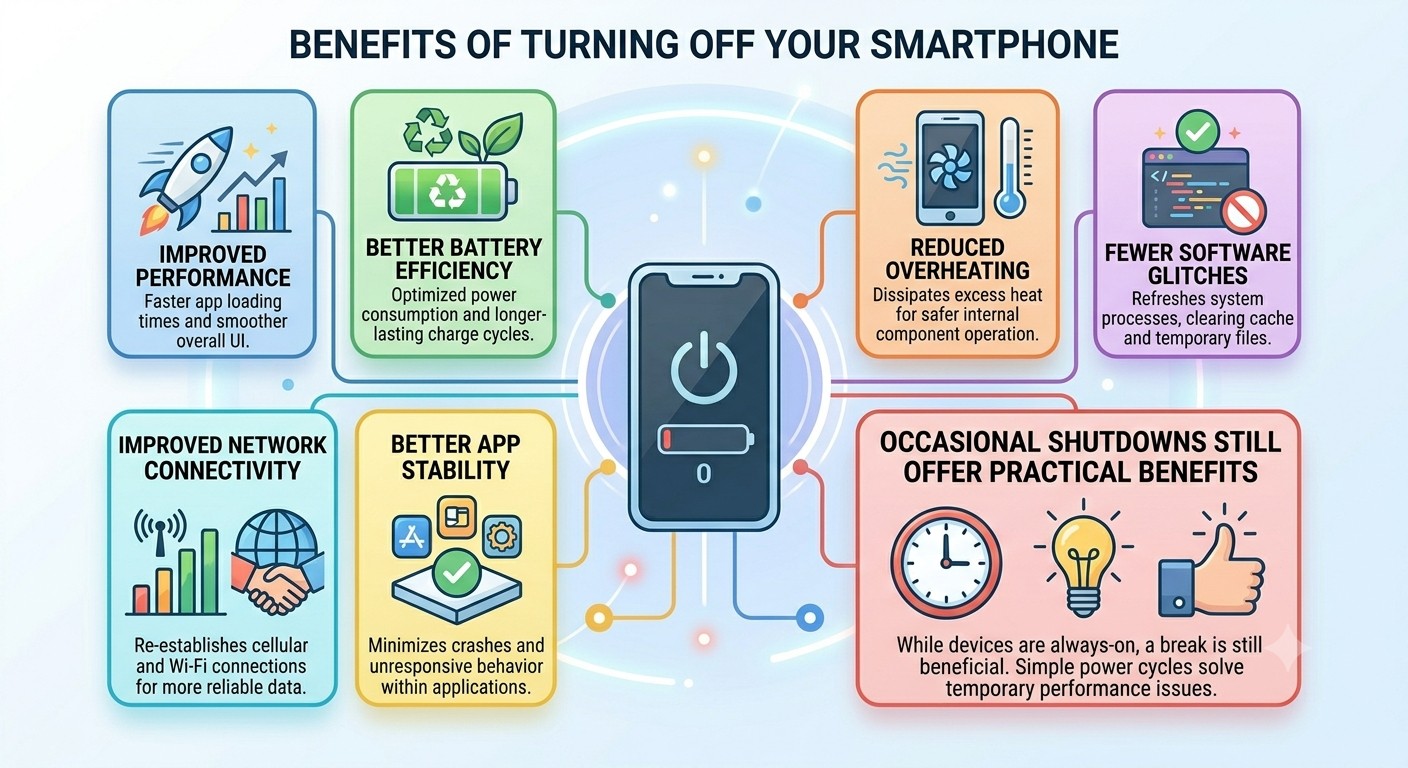
Although modern devices are designed to remain powered on, occasional shutdowns still offer several practical benefits. Many temporary performance problems can be resolved simply by powering the device down and turning it back on again.
Benefits include:
- Improved performance
- Better battery efficiency
- Reduced overheating
- Fewer software glitches
- Improved network connectivity
- Better app stability
A shutdown allows the operating system to close unnecessary processes and clear temporary memory. This gives the device a fresh start and can improve overall responsiveness.
For users experiencing recurring problems, restarting should always be one of the first troubleshooting steps before considering repairs or upgrades.
Improved Performance
Every application you open uses a portion of your phone’s memory and processing power. While modern operating systems manage resources efficiently, background processes can still accumulate over time.
When too many processes remain active, phones may become slower to respond. Apps can take longer to launch, menus may feel sluggish, and multitasking performance may decline.
Turning your phone off clears temporary memory and forces the operating system to start fresh. Once powered back on, system resources can be allocated more effectively.
Many users notice smoother performance and faster app loading times immediately after restarting their devices. This is particularly noticeable on older smartphones with limited RAM and storage capacity.
Better Battery Efficiency
Battery life is one of the most important aspects of smartphone performance. Even when a device appears idle, background applications may continue consuming power.
Social media apps, location services, messaging platforms, and system processes can all contribute to battery drain throughout the day.
Shutting down your phone temporarily stops all background activity. This allows users to determine whether battery drain is being caused by software or hardware issues.
Although powering off a device does not permanently improve battery health, it can help optimise short-term battery performance and identify problematic apps that consume excessive power.
Reduced Overheating
Smartphones generate heat whenever they perform demanding tasks. Activities such as gaming, video streaming, GPS navigation, video editing, and downloading large files can place significant strain on the processor.
Over time, excessive heat can affect battery efficiency and overall performance. While modern devices include safeguards against overheating, prolonged exposure to high temperatures is not ideal.
Turning your phone off allows internal components to cool naturally. This can improve stability and reduce the risk of performance throttling caused by excessive heat.
Users who frequently experience overheating should also check for software updates and review battery health to identify any underlying issues.
Fewer Software Glitches
Even the most advanced smartphones occasionally encounter software bugs. Apps may freeze unexpectedly, notifications may stop appearing, or system functions may become unreliable.
Many of these problems are temporary and do not indicate serious hardware faults. They often occur because background processes conflict with one another or because temporary system files become corrupted.
A complete shutdown clears these temporary issues and refreshes system resources. This is why restarting is one of the first recommendations offered by technical support teams worldwide.
Regular restarts can help minimise software glitches and maintain a more reliable user experience.
How Do I Shut My Phone Off? Step-by-Step Instructions for iPhone, Samsung & Android Devices
Quick Reference: How to Shut Off Your Phone
| Device | Buttons to Press | Action |
|---|---|---|
| iPhone X and Newer | Side Button + Volume Button | Slide to Power Off |
| Older iPhones | Power Button | Slide to Power Off |
| Samsung Galaxy | Side Button + Volume Down | Tap Power Off |
| Google Pixel 6+ | Power Button + Volume Up | Tap Power Off |
| Most Android Phones | Hold Power Button | Tap Power Off |

After understanding why shutting down your smartphone can be beneficial, the next step is learning exactly how to do it. One reason so many people search for “How do I shut my phone off?” is because smartphone manufacturers frequently change button combinations and power menu locations. A method that worked on an older phone may no longer work on a newer model.
Whether you use an iPhone, Samsung Galaxy, Google Pixel, or another Android device, the process is generally straightforward once you know the correct steps. In this guide, we’ll explain how to safely turn off different smartphone models and what to do if your device becomes unresponsive.
How to Turn Off an iPhone (iPhone X and Newer)
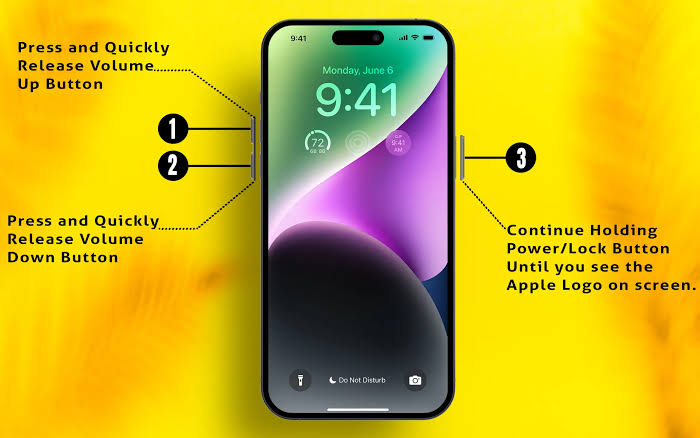
Apple changed the shutdown process when it introduced Face ID and removed the Home Button. As a result, many users upgrading from older devices become confused when trying to power down their phone.
To shut off a modern iPhone:
- Press and hold the Side Button and either Volume Button.
- Wait for the Power Off slider.
- Drag the slider from left to right.
- Wait for the screen to turn black.
This method works on:
- iPhone X
- iPhone XS and XR
- iPhone 11 Series
- iPhone 12 Series
- iPhone 13 Series
- iPhone 14 Series
- iPhone 15 Series
- iPhone 16 Series
Many users upgrading from older devices choose a Refurbished iPhone 13, Refurbished iPhone 14, or Refurbished iPhone 15 because they offer excellent value and long-term software support.
How to Turn Off Older iPhones?

Older Apple devices use a dedicated Power Button, making the shutdown process slightly simpler. Users who still own these models often find them easier to operate because fewer button combinations are required.
To switch off an older iPhone:
- Press and hold the Power Button.
- Wait for the Power Off slider.
- Slide to power off.
- Wait for the device to shut down.
Supported models include:
How to Shut Down an iPhone Without Using Buttons?

If your Side Button or Volume Buttons are damaged, Apple provides a software-based shutdown option within iOS. This method is useful for troubleshooting hardware issues or when physical buttons stop responding.
Steps:
- Open Settings.
- Tap General.
- Scroll down.
- Select Shut Down.
- Slide to Power Off.
Before troubleshooting, it is always recommended to review your guide on how to backup iPhone on the phone to protect important files and personal data.
How to Turn Off a Samsung Phone?
Samsung smartphones remain one of the most popular Android devices in the UK. However, recent Galaxy models use a different shutdown process than many older Samsung phones.
Steps:
- Press and hold the Side Button and Volume Down Button together.
- Wait for the Power Menu.
- Select Power Off.
- Confirm the shutdown.
Samsung introduced this method because the Side Button now supports multiple functions, including voice assistants and shortcuts.
For more detailed instructions, users can also read our guide on how to turn off a Samsung phone.
Using Samsung Quick Settings to Shut Down Your Device
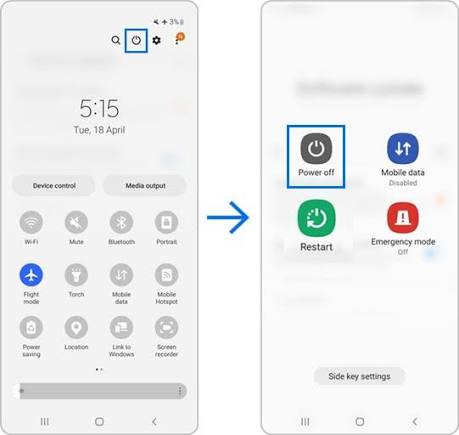
Samsung also provides a convenient shutdown option through the Quick Settings panel. Many users find this method easier than using physical buttons.
Steps:
- Swipe down from the top of the screen.
- Swipe down again to expand Quick Settings.
- Tap the Power icon.
- Select Power Off.
This approach is particularly useful when your device is charging or mounted in a stand.
How to Turn Off a Google Pixel Phone?
Google Pixel devices use a simple shutdown process, although newer models require a different button combination than earlier versions.
For Pixel 6 and newer:
- Press and hold the Power Button and Volume Up Button.
- Wait for the Power Menu.
- Tap Power Off.
Older Pixel models typically require only the Power Button.
How to Shut Off Other Android Phones?
Most Android manufacturers follow a similar shutdown process. While menu layouts may vary slightly, the overall procedure remains familiar across brands.
Popular Android brands include:
- Xiaomi
- OnePlus
- Oppo
- Vivo
- Motorola
- Nokia
- Sony
- Realme
In most cases:
- Hold the Power Button.
- Wait for the Power Menu.
- Tap Power Off.
- Confirm shutdown.
How to Force Restart a Frozen Phone?
A frozen smartphone may not respond to normal shutdown commands. In these situations, a force restart is usually the quickest solution.
Force Restart an iPhone
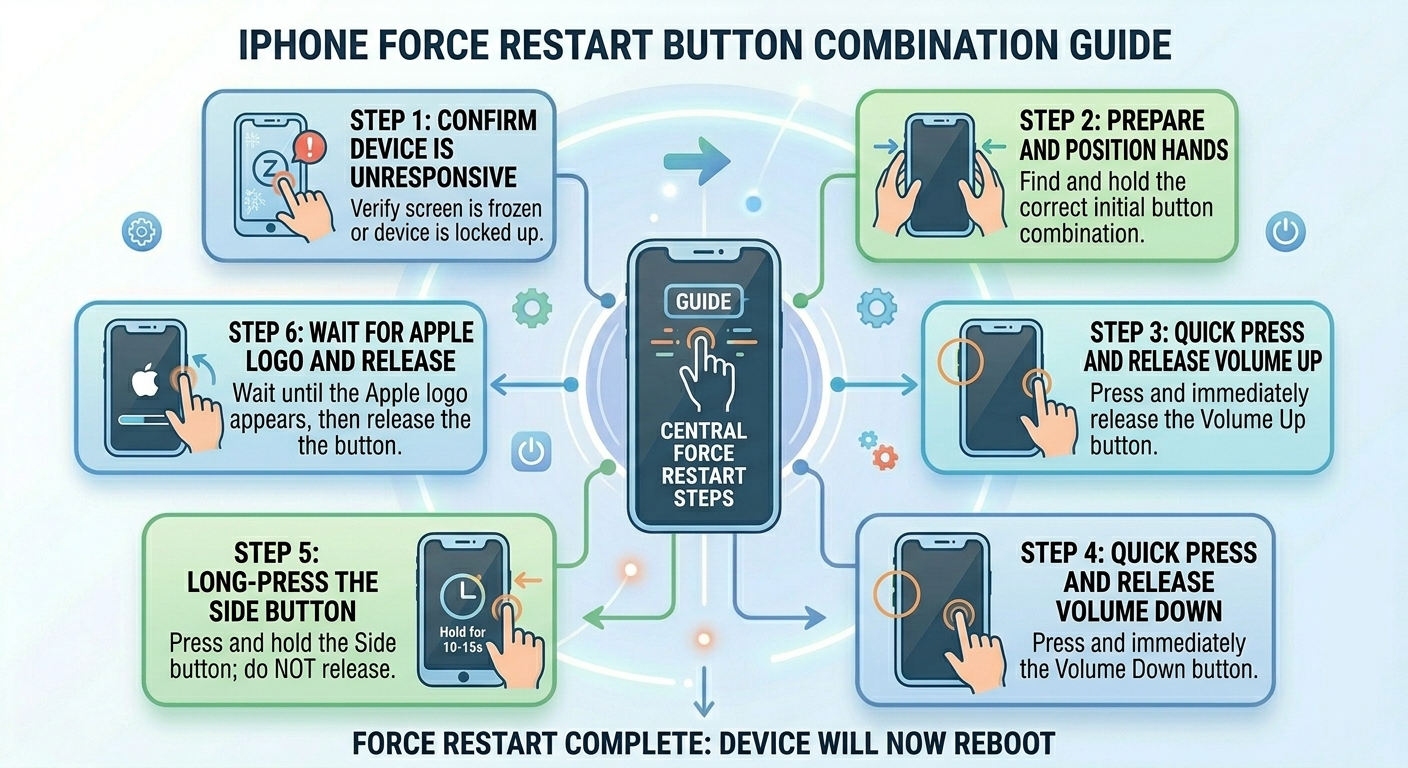
- Press Volume Up.
- Press Volume Down.
- Hold the Side Button.
- Release when the Apple logo appears.
Force Restart a Samsung Device
- Hold the Side Button.
- Hold Volume Down simultaneously.
- Continue holding for 10-15 seconds.
- Release when the Samsung logo appears.
Force Restart Most Android Phones
Hold the Power Button for approximately 10-20 seconds until the device restarts automatically.
What Happens When You Turn Off Your Phone?

Many people believe that shutting down a phone simply turns off the display. In reality, the operating system performs several important actions before powering down completely.
These include:
- Closing active applications
- Saving temporary data
- Disconnecting wireless services
- Stopping background processes
- Powering down internal hardware
This process helps prevent software corruption and ensures a clean startup the next time the device is powered on.
Troubleshooting Common Shutdown Problems and Knowing When to Upgrade
In the previous parts of this guide, we explored why turning off your phone can be beneficial and explained the correct shutdown methods for iPhone, Samsung Galaxy, Google Pixel, and other Android devices. However, knowing how to shut off your phone is only part of the story. Sometimes smartphones refuse to turn off, restart unexpectedly, freeze during shutdown, or experience performance problems that a simple restart cannot fix.
While occasional software glitches are normal, recurring issues may indicate a deeper problem with your device. Understanding these warning signs can help you decide whether your phone needs troubleshooting, repair, or replacement. In this final part of our guide, we’ll explore common shutdown problems, practical solutions, and why many UK consumers are choosing refurbished smartphones as a cost-effective upgrade option.
Why Won’t My Phone Turn Off?
One of the most frustrating smartphone issues occurs when a device refuses to shut down despite following the correct steps. In many situations, the cause is software-related rather than a serious hardware failure.
A phone that will not turn off may:
- Freeze on the shutdown screen
- Ignore button presses
- Continuously restart
- Become unresponsive
- Display error messages
These symptoms often appear after software updates, app installations, or long periods without restarting the device.
Common Reasons a Phone Refuses to Shut Down

Several factors can interfere with the shutdown process and prevent a smartphone from turning off normally.
Common causes include:
- Software bugs
- Frozen applications
- Corrupted system files
- Insufficient storage space
- Faulty power buttons
- Battery-related issues
- Hardware failures
Identifying the root cause can make troubleshooting much easier and prevent unnecessary repairs.
Software Problems Can Prevent Shutdown
Modern smartphones run dozens of background processes simultaneously. Although operating systems are designed to manage these tasks efficiently, occasional software conflicts can occur.
A problematic app may become stuck in the background, preventing the operating system from completing the shutdown process. Likewise, system updates can sometimes introduce temporary bugs that affect power management functions.
Signs of software-related issues include:
- Slow performance
- Apps crashing frequently
- Delayed response times
- Random restarts
- Freezing or lagging
Installing updates and restarting the device regularly can help minimise these problems.
How to Fix a Phone That Won’t Turn Off?
Before assuming your phone requires repair, try several basic troubleshooting steps.
Perform a Force Restart
A force restart can resolve temporary software glitches by forcing the operating system to reload.
Most smartphones can be force restarted using a combination of the Power Button and Volume Buttons. The exact method varies depending on the manufacturer.
Close Background Applications
Too many active apps can sometimes interfere with system functions. Closing unnecessary applications may improve performance and restore normal shutdown behaviour.
Update Your Software
Operating system updates often contain bug fixes that resolve shutdown issues. Check for updates regularly and install them when available.
Remove Problematic Apps
If shutdown problems started after installing a new application, removing it may resolve the issue.
Check Storage Space
Phones with very little available storage can experience unusual behaviour. Deleting unused apps, videos, and files may improve stability.
Could a Faulty Power Button Be the Problem?
The power button is one of the most frequently used components on a smartphone. After years of use, physical wear can affect its performance.
Signs of a faulty power button include:
- No response when pressed
- Delayed activation
- Button sticking
- Inconsistent functionality
If the button is damaged, software-based shutdown options may provide a temporary workaround. However, professional repair may eventually be required.
How Battery Problems Affect Smartphone Reliability?
Battery health has a significant impact on overall smartphone performance. As batteries age, they lose their ability to deliver stable power.
Common battery-related symptoms include:
- Unexpected shutdowns
- Random restarts
- Rapid battery drain
- Charging problems
- Overheating
Many users assume these issues are software-related when the battery is actually the source of the problem.
If your battery health has significantly deteriorated, replacing the battery or upgrading the device may be the most practical solution.
Why Does My Phone Keep Restarting by Itself?
Unexpected restarts are another common complaint among smartphone users. While occasional restarts can occur after updates, repeated rebooting often indicates an underlying issue.
Possible causes include:
- Corrupted apps
- Software bugs
- Battery degradation
- Overheating
- Hardware faults
If your device continues restarting despite troubleshooting, a professional diagnosis may be necessary.
Signs It May Be Time to Upgrade Your Phone
Every smartphone eventually reaches a point where repairs become less practical than replacement. Understanding the warning signs can help you make a cost-effective decision.
Common indicators include:
- Frequent freezing
- Poor battery life
- Slow performance
- Limited storage
- Unsupported software
- Physical damage
- Persistent charging issues
When several of these problems occur together, upgrading may provide a significantly better user experience.
Why Refurbished Phones Are Becoming More Popular?
The cost of new smartphones continues to rise, encouraging many consumers to explore alternative options. Refurbished devices have become increasingly popular because they provide access to premium technology at lower prices.
Benefits include:
- Lower upfront costs
- Thorough testing and inspection
- Environmental sustainability
- Access to flagship devices
- Better value for money
Many buyers are surprised by the quality and reliability of professionally refurbished smartphones.
What Does Refurbished Mean?
A refurbished phone is a previously owned device that has been professionally inspected, tested, cleaned, and restored before resale.
The refurbishment process may include:
- Hardware testing
- Battery assessments
- Software restoration
- Cosmetic grading
- Component replacement when necessary
Buying from a trusted retailer helps ensure that the device meets quality standards and performs as expected.
Choosing the Right Refurbished Smartphone
Many consumers choose refurbished devices because they can purchase higher-end models without paying full retail prices.
Popular refurbished options include:
Apple Devices
- Refurbished iPhone 13
- Refurbished iPhone 14
- Refurbished iPhone 15
- Refurbished iPhone 16
- Refurbished iPhone 16 Pro
- Refurbished iPhone 16 Pro Max
Samsung Devices
These devices continue to offer excellent performance, camera quality, and software support.
Why SIM-Free Phones Offer More Flexibility
Many smartphone buyers also choose SIM-free devices because they are not tied to a specific network provider.
Benefits include:
- Freedom to choose any compatible network
- Easier switching between providers
- Potential savings on contracts
- Better resale value
Combining a SIM-free device with a refurbished smartphone often provides the best balance of affordability and flexibility.
Should I Turn Off My Phone Every Night?
Most modern smartphones do not need to be turned off every night. However, restarting your phone once or twice a week can help refresh system resources, clear temporary files, and improve overall performance.
Turning your phone off overnight may be beneficial if you are troubleshooting software issues, conserving battery power, travelling, or experiencing overheating problems. For most users, regular restarts provide the same benefits without the need for daily shutdowns.
If your device frequently freezes, slows down, or develops performance issues, a restart should be one of the first troubleshooting steps before considering repairs or replacement.
Does Turning Off Your Phone Save Battery Life?
Yes, turning off your phone completely prevents background apps, wireless connections, and system processes from consuming power. While shutting down your phone overnight can save battery life during that period, modern smartphones are designed to manage power efficiently even when left on. For most users, restarting the device once or twice a week is sufficient to maintain good performance and battery efficiency.
Frequently Asked Questions About How to Shut Off Your Phone
1. How do I shut off my phone completely?
The exact method depends on your device. Most modern smartphones require you to press and hold specific button combinations to access the Power Menu. Once the menu appears, select Power Off and wait for the device to shut down completely. This stops all apps, background processes, and wireless connections until the phone is powered back on.
2. Why won’t my phone turn off when I press the power button?
A phone that won’t turn off may be experiencing software glitches, frozen applications, battery problems, or a faulty power button. Performing a force restart is often the quickest solution. If the issue continues, checking for software updates or seeking professional diagnosis may be necessary.
3. Is restarting my phone the same as turning it off?
No. Restarting automatically powers the phone off and back on again, while shutting down completely turns the device off until you manually switch it back on. A restart is useful for refreshing the operating system, while a full shutdown is often used for troubleshooting or conserving battery power.
4. How often should I turn off my phone?
Most experts recommend restarting your smartphone at least once every week. Regular restarts help clear temporary files, refresh system resources, improve performance, and reduce the likelihood of software-related issues developing over time.
5. Can turning off my phone improve performance?
Yes. Turning off your phone closes background applications, clears temporary memory, and resets system processes. While it will not permanently increase speed, many users notice smoother performance and fewer glitches after restarting or powering down their device.
6. What should I do if my phone freezes and won’t respond?
If your smartphone becomes unresponsive, perform a force restart using the button combination recommended for your device. This safely reloads the operating system without deleting personal files, photos, contacts, or applications.
7. Can I turn off my iPhone without using the power button?
Yes. Apple allows users to shut down an iPhone through the Settings menu. Simply go to Settings > General > Shut Down and slide the Power Off control. This method is particularly useful if your physical buttons are damaged or not functioning properly.
8. Why does my phone keep restarting by itself?
Unexpected restarts can be caused by software bugs, battery degradation, overheating, corrupted apps, or hardware faults. If your phone repeatedly restarts despite software updates and troubleshooting, the battery or internal hardware may require professional inspection.
9. Is it safe to leave my phone switched on all the time?
Modern smartphones are designed to remain powered on for extended periods. However, occasional restarts can improve performance, refresh network connections, reduce minor software issues, and help maintain overall system stability.
10. Should I replace my old phone or repair it?
The answer depends on the age and condition of the device. If your phone suffers from poor battery life, slow performance, software limitations, frequent crashes, or expensive repair costs, upgrading may be the better option. Many users choose professionally refurbished smartphones because they provide excellent performance, warranty protection, and significant savings compared to buying brand-new devices.
11. Should I turn off my phone every night?
No, modern smartphones do not need to be turned off every night. However, restarting your phone once or twice a week can help improve performance, clear temporary files, and reduce minor software issues.
12. Does turning off my phone save battery life?
Yes, a powered-off phone does not run apps or background processes, which prevents battery usage while the device is switched off.
13. Is it bad to leave my phone on all the time?
Modern smartphones are designed to stay on for extended periods, but occasional restarts can help maintain system stability and performance.
14. How often should I restart my phone?
Most experts recommend restarting your smartphone at least once a week to refresh system resources and minimise software-related issues.
15. Can turning off my phone help with overheating?
Yes, shutting down your phone allows internal components to cool down and may help reduce overheating caused by intensive use or background processes.
16. Will turning off my phone improve internet or network connectivity?
In some cases, yes. Restarting your phone refreshes network connections and can resolve temporary Wi-Fi, mobile data, or signal issues.
17. Why does my phone take a long time to turn off?
A slow shutdown may be caused by background apps, software bugs, insufficient storage space, or system updates running in the background.
18. Can I damage my phone by turning it off too often?
No. Turning your phone off or restarting it regularly will not damage the device and is considered a normal part of smartphone maintenance.
19. Does restarting my phone delete any data?
No. A restart does not remove your photos, apps, contacts, messages, or personal files. It simply refreshes the operating system.
20. What is the difference between sleep mode and turning off a phone?
Sleep mode keeps the phone powered on while turning off the display, whereas shutting down completely powers off the operating system and all background processes.
Thinking About Upgrading Your Phone?
If troubleshooting has not resolved your issues and your device is more than three years old, an upgrade may offer better value than repeated repairs.
At iExpert Market, we offer professionally tested refurbished iPhones and Samsung Galaxy devices – each graded, cleaned, and backed by warranty.
Popular options right now:
- Refurbished iPhone 14 – excellent performance, long software support
- Refurbished iPhone 15 – latest design with USB-C
- Refurbished Samsung Galaxy S24 – flagship Android experience
- Refurbished Samsung Galaxy S25 Ultra – best-in-class camera
SIM-free devices give you full network flexibility. Browse our full range at iExpert Market.
Final Thoughts
Knowing how to shut off your phone is a simple but important part of smartphone maintenance. Regularly restarting your device can help improve performance, clear temporary software issues, and keep your phone running smoothly.
If your current device is no longer meeting your needs, iExpert Market offers professionally refurbished smartphones that are thoroughly tested for quality, reliability, and performance. Choosing a refurbished device is a cost-effective way to upgrade your smartphone while also supporting a more sustainable approach to technology.
If your phone frequently freezes, overheats, suffers from battery drain, or experiences ongoing power-related problems, professional assistance may be needed. At iExpert Repairs, our experienced technicians diagnose and repair a wide range of smartphone issues, helping customers restore device performance and extend the lifespan of their devices.
Need Help With Your Phone?
Looking for a reliable smartphone upgrade? Browse our range of professionally tested refurbished iPhones and Samsung Galaxy devices at iExpert Market. If your current phone is suffering from battery issues, charging problems, overheating, or power-related faults, contact iExpert Repairs today for expert diagnostics and professional repair services. Our team is ready to help you get the most from your device.
Back to posts