Quick Answer
If you want to check how old your iPhone is, the easiest way is to use its serial number with Apple’s Coverage Check tool or identify its model number and release year. You can also estimate your iPhone’s age by checking its warranty status, purchase date, activation information, and software support. Knowing how old your iPhone is helps you understand its battery health, expected lifespan, resale value, future iOS compatibility, and whether it’s still worth keeping or upgrading to a Certified Refurbished iPhone.
How to Check How Old Your iPhone Is?
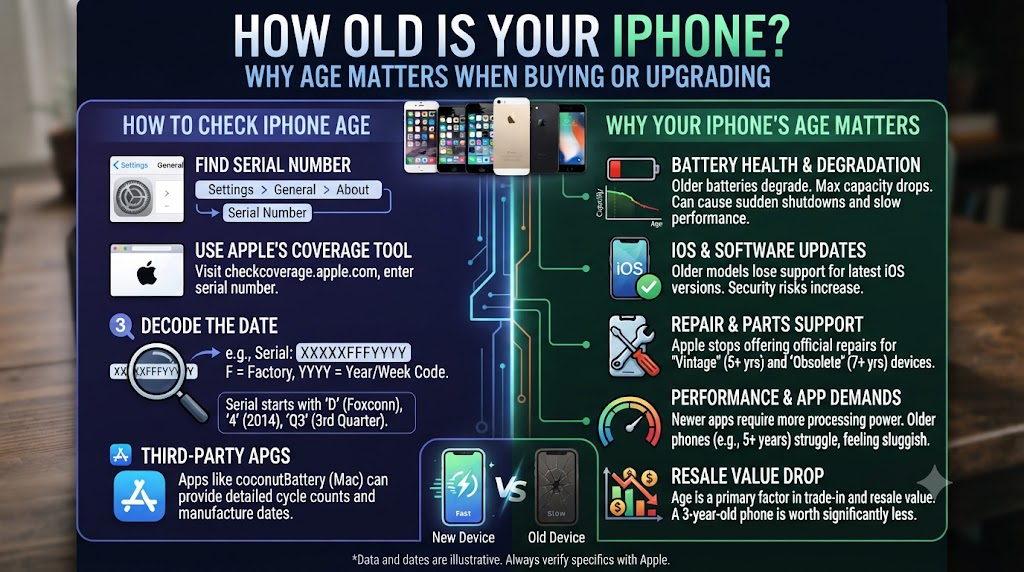
Whether you’re buying a used iPhone, selling your current device, or simply wondering how long you’ve owned it, knowing your iPhone’s age is an important part of understanding its overall value and performance. An iPhone’s age can influence everything from battery health and software support to resale value, repair costs, and long-term reliability.
Fortunately, checking how old your iPhone is is easier than many people think. Apple provides several ways to identify when a device was first activated, while details such as the serial number, model number, warranty status, and release date can help you estimate its age with confidence. These checks are particularly useful when purchasing a second-hand or refurbished iPhone, as they help you verify the device before spending your money.
This complete UK guide explains the most reliable ways to check how old your iPhone is, what your iPhone’s age means for performance and future software updates, and how to determine whether it’s still worth keeping. Whether you own an older iPhone or you’re considering upgrading, you’ll also learn why choosing a Certified Refurbished iPhone from iExpert Market can be a smart, cost-effective alternative to buying new.
Why Should You Check How Old Your iPhone?
Many people assume that if an iPhone looks clean and works well, it must still be in excellent condition. However, an iPhone’s appearance tells only part of the story. The device’s actual age can have a significant impact on its battery health, software compatibility, performance, security updates, resale value, and even repair costs. Whether you’re buying a second-hand iPhone, considering a certified refurbished model, or checking your current device, knowing its age helps you make a smarter and more informed decision.
As iPhones get older, they gradually lose battery capacity, receive fewer iOS updates, and may struggle to run the latest apps and features efficiently. Apple typically supports iPhones with major software updates for several years, but once a device reaches the end of its support cycle, it becomes more vulnerable to security risks and compatibility issues. That’s why checking your iPhone’s age is one of the first things you should do before investing in any Apple device.
For buyers, this information is especially valuable because two identical iPhone models can have very different histories. One may have been activated several years ago and heavily used, while another may have been activated much later and remain in excellent condition. By checking the age alongside the battery health, warranty status, and overall condition, you can determine whether the device offers good value for money.
How Does Your iPhone’s Age Affect Performance?
As an iPhone gets older, several important aspects of the device begin to change. While Apple devices are known for their long lifespan, no smartphone remains at peak performance forever. Understanding how age affects your iPhone helps you decide whether it still meets your needs or whether upgrading to a newer certified refurbished model would provide better value.
| Area | How Age Can Affect Your iPhone |
|---|---|
| Battery Health | Older batteries naturally lose capacity, resulting in shorter battery life and more frequent charging. |
| Performance | Older processors may feel slower when running the latest iOS versions or demanding apps. |
| Software Updates | Older iPhones eventually stop receiving major iOS updates and new security features. |
| Security | Unsupported devices become more vulnerable as security updates come to an end. |
| Storage | Older models often have smaller storage capacities that may no longer suit modern usage. |
| Resale Value | The older the iPhone, the lower its resale value in most cases. |
| Repair Costs | Replacing batteries or damaged components may become less economical on very old models. |
| App Compatibility | Some newer apps and features may not work properly on older iOS versions. |
Although age is important, it should always be considered alongside the device’s condition, battery health, and maintenance history. A well-maintained iPhone can often outperform a newer device that has been neglected.
Common Reasons People Want to Check Their iPhone’s Age
There are many situations where knowing the age of an iPhone becomes useful. Some users simply want to know when their device was released, while others need to verify a phone before buying or selling it. Some of the most common reasons include:
- Buying a second-hand iPhone safely.
- Checking whether an iPhone is still covered by Apple’s warranty.
- Confirming the manufacturing or activation year.
- Finding out if the device still supports the latest version of iOS.
- Estimating the remaining lifespan of the battery.
- Determining the current resale value.
- Comparing two refurbished iPhones before purchasing.
- Deciding whether to repair or upgrade an older device.
- Verifying that a seller’s description is accurate.
- Checking whether an iPhone is still a good investment in 2026.
Knowing the age of your iPhone allows you to make better purchasing decisions and avoid paying premium prices for devices that may already be approaching the end of their useful lifespan.
Before You Check Your iPhone’s Age, Have These Details Ready
You don’t need any specialist software to find out how old your iPhone is, but having a few pieces of information ready will make the process much quicker and more accurate.
| Information You’ll Need | Why It’s Important |
|---|---|
| Serial Number | Used to verify warranty status and estimate the device’s age. |
| Model Number | Identifies the exact iPhone model and release generation. |
| IMEI Number | Helps verify the phone’s identity and can be useful when buying second-hand. |
| Apple ID (Optional) | May be required when checking certain Apple account information. |
| Internet Connection | Needed to use Apple’s online Coverage Check tool. |
Most of this information can be found by opening:
Settings → General → About
This page contains almost everything you’ll need before using the methods explained later in this guide.
What Information Can You Learn by Checking Your iPhone’s Age?
Many people think checking an iPhone’s age simply tells them how old the device is. In reality, it provides much more valuable information that can influence your buying or upgrade decision.
By checking your iPhone’s age, you can often discover:
- Approximately when the iPhone was first activated.
- Which generation and model you own.
- Whether the device is still eligible for Apple software updates.
- If Apple’s limited warranty or AppleCare coverage is still active.
- Whether the hardware is becoming outdated.
- How the phone compares with newer iPhone models.
- Whether buying a Certified Refurbished iPhone would offer better long-term value.
- If the asking price for a used iPhone is reasonable based on its age.
- Whether it’s worth repairing the device or upgrading instead.
The more information you have before buying or selling an iPhone, the easier it becomes to avoid expensive mistakes.
6 Easy Ways to Check How Old Your iPhone Is
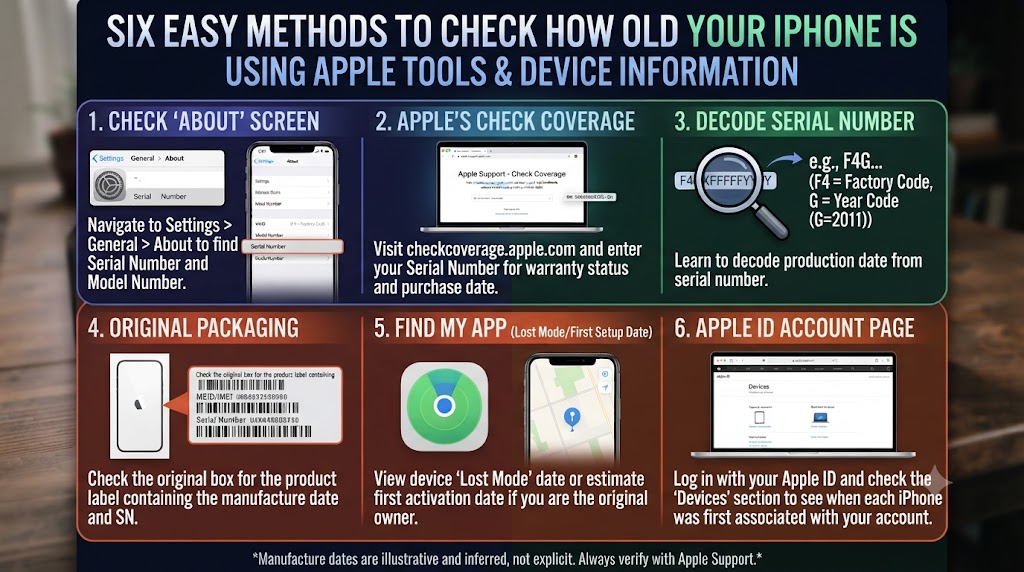
Apple doesn’t display your iPhone’s exact age directly in the Settings app, but there are several reliable ways to determine when your device was manufactured, activated, or first sold. Depending on the information available, you can estimate your iPhone’s age within minutes without downloading any third-party software.
Some methods provide a more accurate estimate than others, so it’s worth comparing multiple sources before making a decision – especially if you’re buying a second-hand or refurbished iPhone.
The table below compares the most effective methods.
| Method | Best For | Difficulty |
|---|---|---|
| Check Apple’s Coverage Tool | Finding the activation date and warranty status | Easy |
| Use the Serial Number | Estimating manufacturing period | Easy |
| Check the Model Number | Identifying the iPhone generation | Easy |
| Find the Original Release Year | Understanding the device’s age | Easy |
| Check Purchase History | Confirming the purchase date | Easy |
| Contact Apple Support | Verifying uncertain information | Easy |
Each of these methods is explained below.
1. Check Your iPhone’s Age Using Apple’s Coverage Check Tool (Recommended)
The easiest and most reliable way to estimate how old your iPhone is is by using Apple’s official Coverage Check service. While Apple doesn’t display the manufacturing date directly, the warranty information and estimated purchase date can help you determine when the device was first activated.
This is particularly useful when buying a second-hand or refurbished iPhone because it helps confirm whether the seller’s description matches the device’s actual history.
How to Check Using Apple Coverage
- Open Settings on your iPhone.
- Go to General.
- Tap About.
- Copy your Serial Number.
- Visit Apple’s Coverage Check website.
- Enter the serial number.
- Complete the security verification.
- View the warranty and estimated purchase information.
If the warranty has expired, you’ll usually be able to estimate when the iPhone was first activated by counting back from Apple’s standard warranty period.
What You’ll Learn
| Information | Why It Matters |
|---|---|
| Warranty Status | Shows whether Apple warranty is still active. |
| Estimated Purchase Date | Helps estimate when the device was first used. |
| AppleCare Eligibility | Indicates available support options. |
| Device Verification | Confirms the serial number is genuine. |
Expert Tip
If you’re buying a used or refurbished iPhone, always compare the warranty information with the seller’s description. If the dates don’t match, ask the seller for clarification before making a purchase.
2. Check the Serial Number to Estimate Your iPhone’s Age
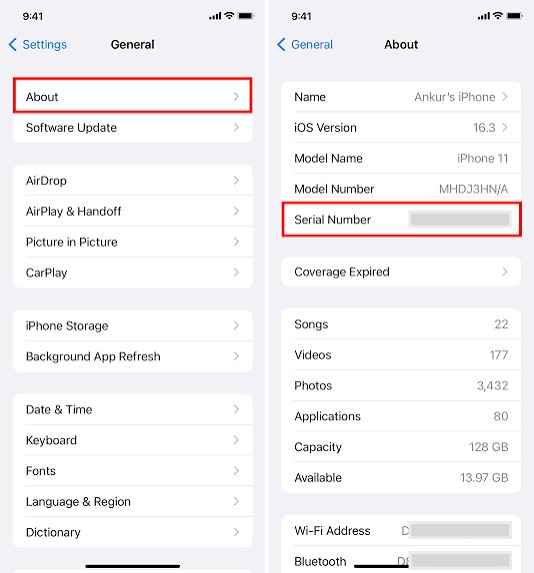
Every iPhone has a unique serial number that identifies the device. Although Apple no longer includes the exact manufacturing date within modern serial numbers, the serial number remains one of the most important identifiers for confirming authenticity, warranty information, and device history. Professional refurbishers and technicians routinely use the serial number alongside Apple’s databases to verify an iPhone before it is sold.
How to Find Your Serial Number
Open:
Settings → General → About
Scroll down until you see Serial Number. You can also find the serial number:
- On the original iPhone box.
- In your Apple ID device list.
- Through Finder (Mac).
- Through iTunes (older Windows PCs).
Why the Serial Number Is Important
| Benefit | Explanation |
|---|---|
| Confirms device identity | Every iPhone has its own unique serial number. |
| Supports warranty checks | Required for Apple’s Coverage Check. |
| Helps verify authenticity | Can reveal whether the phone is genuine. |
| Useful during repairs | Technicians use it to identify the correct model. |
Expert Advice
Never buy a second-hand iPhone if the serial number is missing, altered, or doesn’t match the one shown in Settings. A mismatch may indicate that the device has been repaired using non-original parts or could even be counterfeit.
3. Check the Model Number to Identify the iPhone Generation
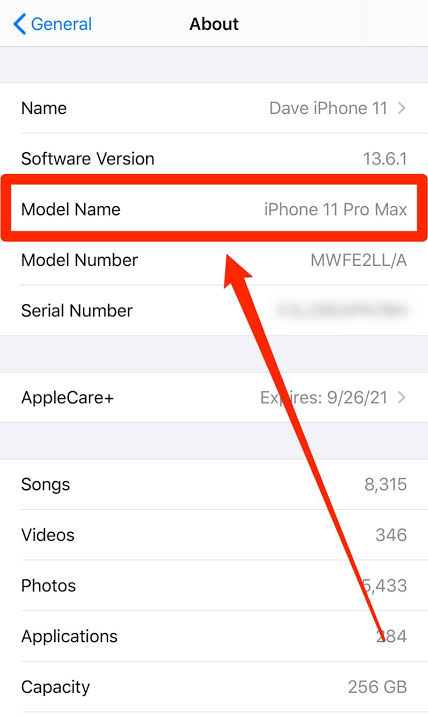
Another simple way to estimate your iPhone’s age is by checking its model number. Although the model number won’t tell you the exact manufacturing date, it identifies the iPhone generation, making it easy to determine when that model was originally released. This method is especially useful if you’re comparing different iPhone models before buying a refurbished device.
How to Find the Model Number
- Open Settings.
- Tap General.
- Select About.
- Locate the Model Number.
- Tap it once if necessary to display the full model identifier.
You can then compare your model with Apple’s official release year. Remember that the release year shows when the model first became available – not necessarily when your specific iPhone was purchased or activated.
4. Find Your iPhone’s Original Release Year

While your iPhone’s release year isn’t the same as its manufacturing or purchase date, it provides a useful benchmark for estimating the device’s overall age. Every iPhone model launches in a specific year, making it easy to understand roughly how old the hardware design is and what level of software support you can expect.
For example, if you own an iPhone 12, you immediately know the device cannot be older than 2020 because that’s when Apple introduced the model. However, your particular phone may have been purchased months or even years later.
Understanding the release year also helps when comparing refurbished iPhones. Two devices may look similar, but a newer generation often includes faster processors, longer software support, improved cameras, and better battery efficiency.
Why the Release Year Matters
The original release year affects several important factors that influence your ownership experience.
| Why It Matters | How It Helps You |
|---|---|
| Software Updates | Newer models receive iOS updates for longer. |
| Security | Devices supported by the latest iOS receive important security patches. |
| Performance | Newer chipsets generally provide faster performance. |
| Battery Efficiency | Later generations are usually more power efficient. |
| Camera Features | Each generation introduces camera improvements. |
| Resale Value | Newer models typically retain higher resale value. |
How to Find Your iPhone’s Release Year
There are several easy ways to identify when your iPhone model was originally launched.
- Open Settings.
- Tap General.
- Select About.
- Note your Model Name (for example, iPhone 13 Pro).
- Compare it with Apple’s official release timeline.
You can also search your model name online or compare it with Apple’s official product history.
Apple iPhone Release Timeline (Popular Models)
| iPhone Model | Original Release | Approximate Age in 2026 |
|---|---|---|
| iPhone X | 2017 | Around 9 years |
| iPhone XR | 2018 | Around 8 years |
| iPhone 11 | 2019 | Around 7 years |
| iPhone 12 | 2020 | Around 6 years |
| iPhone 13 | 2021 | Around 5 years |
| iPhone 14 | 2022 | Around 4 years |
| iPhone 15 | 2023 | Around 3 years |
| iPhone 16 | 2024 | Around 2 years |
5. Check Your Purchase History
If you’re the original owner of the iPhone, your purchase history is one of the most accurate ways to determine how old your device is. Unlike the release year – which only tells you when the model first launched – your purchase records reveal when your specific iPhone was bought.
This information is especially useful for checking warranty eligibility, estimating battery age, calculating resale value, and confirming ownership. Many UK customers can find this information in just a few minutes without contacting Apple.
Where You Can Check the Purchase Date
Depending on where you purchased your iPhone, the purchase date may be available in several places.
| Location | Information Available |
|---|---|
| Apple Order History | Purchase date, order details and invoice |
| Email Receipt | Original purchase confirmation |
| Retail Store Receipt | Exact purchase date |
| Mobile Network Provider | Contract or upgrade date |
| Bank or Card Statement | Payment confirmation |
| Apple Coverage Check | Estimated purchase date (where available) |
Why Your Purchase Date Is Useful
Knowing when your iPhone was purchased helps you make better decisions about keeping, repairing, selling, or upgrading your device.
| Benefit | Why It Matters |
|---|---|
| Warranty Verification | Confirms Apple warranty eligibility. |
| Battery Age | Older batteries naturally lose capacity over time. |
| Insurance Claims | Proof of ownership may be required. |
| Resale Value | Buyers often ask when the phone was originally purchased. |
| Upgrade Planning | Helps determine whether it’s time for a newer device. |
6. Contact Apple Support to Verify Your iPhone’s Age
If you’re still unsure how old your iPhone is after checking the serial number, warranty status, purchase records, and model number, contacting Apple Support is the most reliable option. Apple’s support team can verify important information linked to your device, including warranty eligibility, activation details, repair history (where applicable), and product registration.
This method is particularly useful if:
- You bought a second-hand iPhone without the original receipt.
- The seller cannot confirm the purchase date.
- Warranty information is unavailable.
- The serial number check returns unexpected results.
- You want to confirm the device before buying it.
Although Apple won’t always provide the exact manufacturing date, they can often help verify when the device first entered Apple’s system and whether the information matches the seller’s claims.
What Information Apple May Confirm
| Information | Why It’s Useful |
|---|---|
| Warranty Status | Indicates whether the device is still covered by Apple. |
| Estimated Purchase Date | Helps estimate when the iPhone was first activated. |
| AppleCare Coverage | Shows whether AppleCare or AppleCare+ is active. |
| Device Registration | Confirms the serial number belongs to a genuine Apple product. |
| Repair Eligibility | Indicates whether the device qualifies for Apple service. |
What You’ll Need Before Contacting Apple
Having the correct information ready will make the process much faster.
| Required Information | Where to Find It |
|---|---|
| Serial Number | Settings → General → About |
| Model Name | Settings → General → About |
| Apple ID (if requested) | Apple Account Settings |
| Proof of Purchase (if available) | Email receipt or retailer invoice |
Ways to Contact Apple Support
Apple offers several official support options depending on your preference.
| Support Method | Best For |
|---|---|
| Apple Support App | Fast support directly from your iPhone |
| Apple Support Website | Online assistance and warranty checks |
| Live Chat | Quick questions and troubleshooting |
| Phone Support | Speaking directly with an Apple advisor |
| Apple Store Appointment | In-person inspection and diagnostics |
Our Recommendation
For the most accurate results, combine these three methods:
- Check Apple’s Coverage Tool
- Verify the Serial Number
- Confirm the Model Number and Release Year
Using all three together gives you a much clearer picture of your iPhone’s actual age, authenticity, warranty status, and long-term value. If you’re planning to replace an older iPhone after checking its age, our Complete Guide to Choosing the Best Refurbished iPhone explains which refurbished models offer the best value, performance, and long-term software support for UK buyers.
How Old Is Too Old for an iPhone?
One of the most common questions people ask after discovering their iPhone’s age is whether it’s still worth keeping. The answer depends on much more than the number of years since it was released. Battery condition, software support, storage capacity, overall performance, and how the device has been maintained all play a significant role.
For example, a professionally refurbished iPhone that’s five years old but fitted with a healthy battery and thoroughly tested can often outperform a newer second-hand device that has been poorly maintained.
Instead of focusing solely on age, it’s important to look at the overall condition of the device and whether it still meets your daily needs.
Factors That Matter More Than Age
When deciding whether your iPhone is still worth using, consider the following factors.
| Factor | Why It Matters |
|---|---|
| Battery Health | A worn battery reduces performance and daily usability. |
| iOS Support | Devices receiving the latest updates remain more secure. |
| Processor Performance | Newer chips handle modern apps more efficiently. |
| Storage Capacity | Limited storage can slow your experience. |
| Physical Condition | Screen, cameras and buttons affect usability. |
| Repair History | Professionally repaired devices are generally more reliable than poorly repaired ones. |
Typical Lifespan of an iPhone
Apple designs its iPhones to last for many years. With regular software updates, quality components, and proper care, many users continue using the same device for five years or longer.
The table below provides a general guide to what you can expect as an iPhone gets older.
| iPhone Age | Typical Condition | Recommendation |
|---|---|---|
| 0-2 Years | Excellent performance and full software support | Keep using with confidence |
| 3-4 Years | Very good performance for most users | Still an excellent everyday device |
| 5-6 Years | Performance may begin to slow and battery wear becomes more noticeable | Consider battery replacement or upgrading if needed |
| 7+ Years | Limited software support and ageing hardware | Upgrading is often the better long-term investment |
These are only general guidelines. A well-maintained iPhone with a healthy battery can remain reliable for much longer than expected.
Signs Your iPhone May Be Reaching the End of Its Useful Life
Age alone doesn’t determine whether it’s time to replace your iPhone. Instead, watch for a combination of performance and hardware issues.
Common warning signs include:
- Battery drains much faster than it used to.
- Apps take noticeably longer to open.
- The latest iOS version is no longer supported.
- The device overheats during everyday use.
- Storage constantly runs out despite deleting files.
- The camera no longer meets your needs.
- Repairs are becoming increasingly expensive.
- Multiple hardware components are beginning to fail.
If several of these issues occur together, upgrading may provide a better experience than continuing to repair an ageing device.
Is an Older Refurbished iPhone Still Worth Buying?
Absolutely – provided it’s been professionally refurbished. Many buyers assume they need the latest iPhone, but that’s not always the most cost-effective choice. A certified refurbished iPhone that’s been fully tested, graded, and quality checked can deliver outstanding performance while costing significantly less than buying new.
This is especially true for popular models such as the iPhone 12, iPhone 13, and iPhone 14, which continue to offer excellent speed, cameras, and software support.
Benefits of Buying a Certified Refurbished iPhone
| efit | Why It Matters |
|---|---|
| Lower Cost | Save significantly compared with buying new. |
| Professional Testing | Devices are inspected and tested before sale. |
| Battery Health Checks | Ensures dependable everyday performance. |
| Warranty Included | Provides extra peace of mind. |
| Better Value | Premium Apple quality at a more affordable price. |
| Environmentally Friendly | Extends the life of existing devices and reduces electronic waste. |
Does an iPhone’s Age Affect Performance?
Yes. As an iPhone gets older, its performance can gradually decline, but age itself isn’t the only reason. Battery wear, newer versions of iOS, storage limitations, and years of daily use all contribute to how fast or slow an iPhone feels.
However, it’s important to understand that an older iPhone isn’t automatically a poor-performing device. A well-maintained iPhone with good battery health and sufficient storage can still deliver excellent everyday performance, while a newer device that’s been heavily used may struggle with speed and reliability.
This is why professional refurbishers evaluate much more than the release date before deciding whether an iPhone is suitable for resale.
How iPhone Age Impacts Everyday Use?
As your iPhone gets older, you may notice gradual changes in its performance rather than sudden failures. These changes often happen over several years and become more noticeable as new apps and software updates demand more from the hardware.
Common Areas Affected by Age
| Feature | Effect as the iPhone Gets Older |
|---|---|
| Battery Life | Shorter daily usage between charges. |
| App Performance | Apps may take longer to open. |
| Gaming | Lower frame rates on demanding games. |
| Camera Processing | Image processing may be slower. |
| Multitasking | Switching between apps may become less responsive. |
| Software Support | Older models eventually stop receiving new iOS updates. |
Battery Health Has a Bigger Impact Than Age
Many users assume their iPhone feels slow because it’s old, when in reality the battery is often responsible.
Lithium-ion batteries naturally lose capacity over time. As battery health declines, iOS may reduce peak processor performance to prevent unexpected shutdowns. This can make the phone feel slower, even if the processor itself is still perfectly capable.
Battery Health Guide
| Battery Health | What It Usually Means |
|---|---|
| 100-90% | Excellent performance |
| 89-80% | Normal wear with little impact |
| Below 80% | Battery replacement is recommended |
| Below 75% | Performance and battery life may noticeably decline |
You can check your battery health by going to:
Settings → Battery → Battery Health & Charging
Software Support Also Matters
Apple is well known for providing long-term software support, but every iPhone eventually reaches the end of its update cycle. Once a device no longer receives the latest version of iOS, it may:
- Miss important security updates.
- Lose compatibility with newer apps.
- Experience reduced performance in modern applications.
- Become more vulnerable to software issues over time.
This doesn’t mean the iPhone immediately becomes unusable, but it does reduce its long-term value and security.
Storage Can Make an Older iPhone Feel Slower
Another commonly overlooked factor is storage.
When an iPhone’s storage is almost full, everyday tasks such as opening apps, installing updates, taking photos, and switching between applications can become noticeably slower.
Tips to Improve Performance
- Delete unused apps.
- Remove duplicate photos and videos.
- Clear Safari data.
- Back up files to iCloud or another storage service.
- Keep at least 10-20% of your storage free for optimal performance.
These simple maintenance steps can significantly improve responsiveness, even on older iPhones.
When Should You Upgrade Your iPhone?
There’s no fixed rule for when you should replace your iPhone. The right time depends on its performance, battery condition, software support, and whether it still meets your daily needs.
Many people continue using the same iPhone for five or six years without any major issues. Others may choose to upgrade sooner to benefit from improved cameras, longer battery life, or newer Apple features.
The table below provides a general guide.
| Situation | Recommendation |
|---|---|
| Battery health remains above 85% and performance is good | Keep using your iPhone. |
| Device still receives the latest iOS updates | No immediate upgrade is necessary. |
| Battery health is below 80% | Consider replacing the battery or upgrading. |
| Performance has become noticeably slow | Compare repair costs with a refurbished upgrade. |
| iPhone no longer receives iOS updates | Upgrading is recommended for improved security and compatibility. |
| Multiple hardware faults are developing | Replacing the device is often more cost-effective than repeated repairs. |
Why Many UK Buyers Choose Certified Refurbished iPhones
Upgrading doesn’t always mean buying the newest iPhone.
For many UK customers, a Certified Refurbished iPhone offers the ideal balance between performance, reliability, and affordability. Professionally refurbished devices undergo extensive testing to ensure they meet high quality standards before being sold.
At iExpert Market, every refurbished iPhone is:
- Professionally inspected by experienced technicians.
- Fully hardware tested.
- IMEI and Activation Lock verified.
- Battery health checked.
- Securely data wiped.
- Quality graded.
- Backed by a warranty for added peace of mind.
This allows customers to enjoy premium Apple devices at a significantly lower price than buying brand new.
Why Buy a Certified Refurbished iPhone Instead of an Older Used One?
Once you’ve discovered how old your iPhone is, the next question is often whether it’s worth keeping, repairing, or replacing. If your current device is no longer meeting your needs, upgrading doesn’t necessarily mean buying the latest brand-new iPhone.
For many UK buyers, a Certified Refurbished iPhone offers the perfect balance between performance, reliability, quality, and affordability. Unlike many privately sold second-hand phones, professionally refurbished devices undergo extensive testing, quality checks, and certification before being offered for sale.
This means you can enjoy modern Apple performance while spending significantly less than you would on a new device.
Certified Refurbished iPhone vs Typical Used iPhone
When buying an iPhone, it’s important to understand the difference between a certified refurbished device and a typical used iPhone. Although both have had previous owners, the buying experience can be completely different.
A certified refurbished iPhone is professionally inspected, tested, repaired where necessary, and quality checked before being sold. In contrast, a used iPhone is often sold in its existing condition with little or no testing, making its history and reliability less certain.
| Feature | Certified Refurbished iPhone | Typical Used iPhone |
|---|---|---|
| Professional Hardware Testing | Thoroughly tested using professional diagnostic equipment to ensure every component works correctly. | Usually sold without a full hardware inspection or diagnostic testing. |
| Battery Health Assessment | Battery health is carefully checked to meet quality standards before sale. | Battery condition varies and may not be disclosed accurately. |
| IMEI & Device Verification | IMEI is verified to confirm the device is genuine and not blacklisted. | IMEI checks may not always be completed by private sellers. |
| Activation Lock Status | Fully checked to ensure the device is removed from the previous owner’s Apple ID and ready to use. | Activation Lock may still be enabled, potentially making the phone unusable. |
| Cosmetic Condition | Professionally graded with clear descriptions of any cosmetic wear. | Cosmetic condition is often based on the seller’s personal opinion. |
| Warranty Protection | Includes a warranty for added peace of mind and customer confidence. | Most privately sold used iPhones are sold without any warranty. |
| Quality Assurance | Undergoes multiple quality control checks before reaching the customer. | Quality depends entirely on how the previous owner cared for the device. |
| After-Sales Support | Ongoing customer support is available if you need assistance after purchase. | After-sales support is usually unavailable once the sale is complete. |
What Makes a Certified Refurbished iPhone Different?
At iExpert Market, every refurbished iPhone follows a strict inspection and refurbishment process before it’s made available for sale. Each device undergoes:
- Comprehensive hardware diagnostics
- Battery health assessment
- IMEI and blacklist verification
- Activation Lock checks
- Camera testing
- Display inspection
- Speaker and microphone testing
- Charging port inspection
- Face ID or Touch ID testing
- Connectivity testing (Wi-Fi, Bluetooth and mobile network)
- Cosmetic grading
- Secure data wiping
- Final quality assurance inspection
Only devices that successfully pass every stage are approved for resale.
Benefits of Buying a Refurbished iPhone
Choosing a certified refurbished iPhone offers several advantages beyond simply saving money.
| Benefit | Why It Matters |
|---|---|
| Lower Purchase Price | Save hundreds compared with buying new. |
| Professional Testing | Ensures the device performs as expected. |
| Warranty Included | Added confidence after purchase. |
| Better Value | Premium Apple quality at a more affordable cost. |
| Environmentally Friendly | Extends the life of existing devices and reduces electronic waste. |
| Wide Model Selection | Choose from recent and older iPhone generations. |
For students, professionals, families, and everyday users, refurbished devices often represent the smartest balance between cost and performance.
FAQs About Checking Your iPhone’s Age
1. How can I check how old my iPhone is?
The easiest way to check how old your iPhone is is by using Apple’s Coverage Check tool with your device’s serial number. You can also identify your iPhone’s model number, original release year, warranty status, purchase history, or software support to estimate its age accurately.
2. Can I see my iPhone’s manufacturing date?
Apple does not display the exact manufacturing date in iPhone settings. However, you can estimate your iPhone’s age using its serial number, activation date, warranty information, and original model release year.
3. Where can I find my iPhone’s serial number?
You can find your iPhone’s serial number by going to Settings > General > About. It is also printed on the original box and available in your Apple ID account under your registered devices.
4. Does Apple’s Coverage Check show how old my iPhone is?
Apple’s Coverage Check doesn’t show the manufacturing date directly, but it displays your warranty status and estimated purchase date, helping you determine when your iPhone was first activated.
5. Can I check my iPhone’s age without the serial number?
Yes. You can estimate your iPhone’s age by checking its model number, identifying the original release year, reviewing your purchase receipt, or logging into your Apple ID purchase history.
6. Does the iPhone model number tell me how old the phone is?
The model number identifies the iPhone generation and release year, allowing you to estimate the device’s age even though it doesn’t show the exact manufacturing date.
7. How old is too old for an iPhone?
Most iPhones remain reliable for around five to seven years with proper care. After that, software support, battery health, and performance may begin to decline, making an upgrade worth considering.
8. Why should I know how old my iPhone is?
Knowing your iPhone’s age helps you understand its remaining software support, battery condition, resale value, repair costs, and whether upgrading to a newer or refurbished model would be a better investment.
9. Can battery health tell me how old my iPhone is?
Battery health alone cannot determine your iPhone’s exact age because batteries can be replaced. However, poor battery health often indicates that the device has been used extensively.
10. How do I know if my iPhone still receives iOS updates?
Go to Settings > General > Software Update to check for available updates. You can also compare your model with Apple’s supported device list to see whether it still receives the latest iOS versions.
11. Is an older iPhone still worth buying?
Yes. A well-maintained or professionally refurbished older iPhone can still offer excellent performance, especially if it continues to receive software updates and has good battery health.
12. What’s the difference between an old iPhone and a refurbished iPhone?
An old iPhone is simply a previously used device, while a certified refurbished iPhone has been professionally inspected, tested, cleaned, repaired if necessary, and quality checked before being sold with a warranty.
13. Can I check the purchase date of my iPhone?
Yes. You can verify the purchase date through Apple’s Coverage Check tool, your Apple ID purchase history, your retailer’s invoice, or the original proof of purchase.
14. Does resetting my iPhone change its age?
No. Factory resetting your iPhone only erases its data and settings. It does not affect the manufacturing date, activation date, warranty information, or overall age of the device.
15. Can I check how old a second-hand iPhone is before buying it?
Yes. Before purchasing a used iPhone, check its serial number, warranty status, activation date, battery health, model number, and IMEI to verify its age and authenticity.
Final Thoughts
Knowing how old your iPhone is isn’t just about satisfying curiosity – it plays an important role in understanding your device’s overall value, long-term performance, software compatibility, battery health, and future repair costs. Whether you’re planning to keep your current iPhone, buy a second-hand device, sell your existing one, or upgrade to a newer model, accurately checking its age helps you make a more informed decision.
Fortunately, Apple provides several reliable ways to estimate your iPhone’s age. By checking the serial number, warranty information, model number, original release year, purchase history, and software support, you can build a clear picture of your device’s lifecycle. Using more than one method is the best way to verify the information, particularly when purchasing a used or refurbished iPhone from a private seller.
It’s also important to remember that an older iPhone isn’t necessarily a poor device. Many Apple smartphones continue to deliver excellent performance for years when they’ve been well maintained, regularly updated, and fitted with a healthy battery. On the other hand, a newer iPhone that’s been heavily used or poorly cared for may offer a worse experience than an older, professionally refurbished model. That’s why checking both the age and overall condition of an iPhone is essential before making a purchase.
If your current iPhone is no longer receiving iOS updates, has significantly reduced battery health, or the cost of repairs outweighs its value, upgrading to a Certified Refurbished iPhone can often be the smartest and most cost-effective solution. Professionally refurbished devices provide excellent performance, quality assurance, and substantial savings compared with buying brand-new models.
Why Thousands of UK Customers Choose iExpert Market
Customers across the UK trust iExpert Market because we provide:
- Certified Refurbished Apple Devices
- 10+ Years of Industry Experience
- Professionally Tested iPhones
- Premium Quality Assurance Process
- Transparent Cosmetic Grading
- Competitive UK Pricing
- Warranty Included
- Secure UK-Wide Delivery
- Excellent Customer Support
- Flexible Klarna – Fix Now, Pay Later
- Regularly Updated Stock
- Trusted UK Refurbished Technology Specialists